In short
- Write the evaluation sheet from the decisions the office owns, never from the last office's sheet.
- Ask each vendor to load your structure, your approval routes and your board pack, in your words.
- Score only what was done live on your own data, and start with a pilot on that data.
The strategy office is two months old when it is asked to choose its software. Procurement sends over the evaluation sheet from the last purchase, made three years ago by the IT project office. The criteria are still there: Gantt chart, resource levelling, timesheets, critical path.
The vendor with the best schedule view wins. Six months later the strategy director is building the quarterly board pack in slides again. The new tool holds every task in the portfolio. It cannot say which objective a project serves, who lowered a KPI target in June, or which decisions the board owes this quarter.
Nobody chose badly. The office bought a good tool for a different office.
Search for program management tools, or for PMO software, and you find lists that rank products on features. I think the question comes earlier than that: which office is buying, and what does it decide? A project PMO, an enterprise PMO (EPMO) and a strategy PMO (SPMO), which some organisations call a strategy management office (SMO), shop in the same category of software and need different things from it.
What goes wrong
Offices tend to buy the tool the last office's evaluation sheet describes. Four things follow, in order.
The sheet is inherited. The project office usually buys first, so its criteria become the template. They are about scheduling, because scheduling is what a project office does and what a demonstration shows best. A strategy office that reuses it scores vendors on work it does not do.
The model decides what can be asked. A tool built around projects holds projects, tasks, dates and resources. A strategy office needs objectives, KPIs with targets, and the link from each target to the work meant to move it. Where the model has no place for a target, no report can show who changed one. The targets stay in a spreadsheet beside the tool, which becomes the record for the part the board cares about most.
Governance happens outside the tool. An enterprise PMO earns its authority by enforcing who may approve what. If approvals travel by email and the tool records only the outcome, the office can report a decision and cannot show that the right authority took it.
The pack is rebuilt by hand. When the tool cannot produce what the board reads, an analyst copies figures into slides each month. The office's real work moves into the deck, where nobody can trace it.
Each of these looks small on the day of purchase. Together they mean the organisation pays for a platform and the office still does its main job by hand.
What each office needs from program management tools
The offices overlap, and one team often plays two of the roles. Where the strategy office ends and the delivery side begins is the subject of What a strategy management office does.
| Office | Decisions it owns | What the tool must hold | What it must produce |
|---|---|---|---|
| Project PMO | Dates, scope changes, risks raised to the steering committee | Schedules with dependencies and baselines, risks and issues, change requests | Project status and the steering committee pack |
| Enterprise PMO (EPMO) | Which projects run, stage gates, shared capacity and money across departments | One portfolio model over each department's method, approval routes by value, capacity by month | Portfolio roll-ups on one scale, gate decisions, exceptions |
| Strategy PMO (SPMO) | Changes to targets, money moved between initiatives, what to start and stop | Strategy levels, KPIs with plan, actual and forecast, and the link from each KPI to the work | The strategy progress report, the KPI scorecard and the decisions owed |
What good looks like
These moves turn an evaluation into a test of fit. They work with any vendor, and the order matters.
Write the evaluation sheet from the decisions the office owns
Before any vendor list, write down the decisions the office owns or prepares, and the forum that takes each one. Each line becomes a criterion: show me how this decision is prepared, taken and recorded. A feature earns a place on the sheet only when a decision depends on it. In Lodestar, each governance body is set up with its terms of reference, its decision authority, its quorum and its meeting cadence, and a decision is recorded with the options considered, who decided it and the date.
Ask each vendor to load your structure, in your words
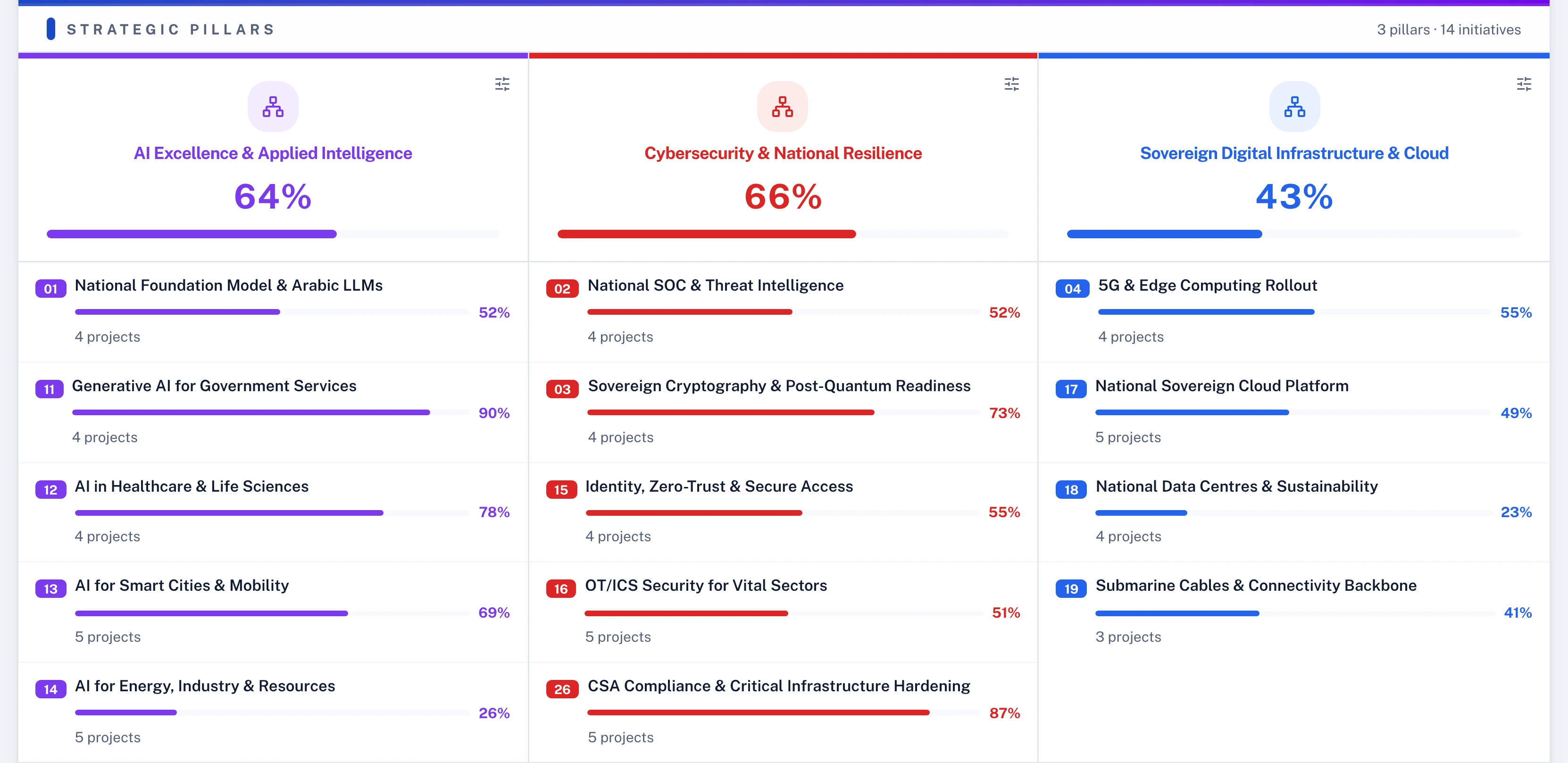
Give every vendor your real hierarchy: the levels your strategy uses, their names, the KPIs and the projects beneath them. If the vendor has to rename your strategy to fit the product, the board will read the product's words, and every pack will need translating. In Lodestar, the strategy hierarchy is configured for each client, up to four levels in the client's own terms, starting from presets such as pillars and initiatives, OKR themes and objectives, or portfolios and programmes. Any KPI can be linked to the one activity, milestone, task or sub-task its progress depends on.
Watch the governance refuse someone
Bring your delegation of authority. Ask the vendor to build one route from it during the session: a budget change above a set amount, or a change to a KPI target. Then raise a request as an ordinary user and try to approve it yourself. An enterprise PMO stands or falls on this test. In Lodestar, Workflow Studio sets approval routes for 23 kinds of change without code, with value thresholds, committees and time-boxed delegation. The person who raises a request can never approve it, administrators included.
Have next month's pack produced in the session
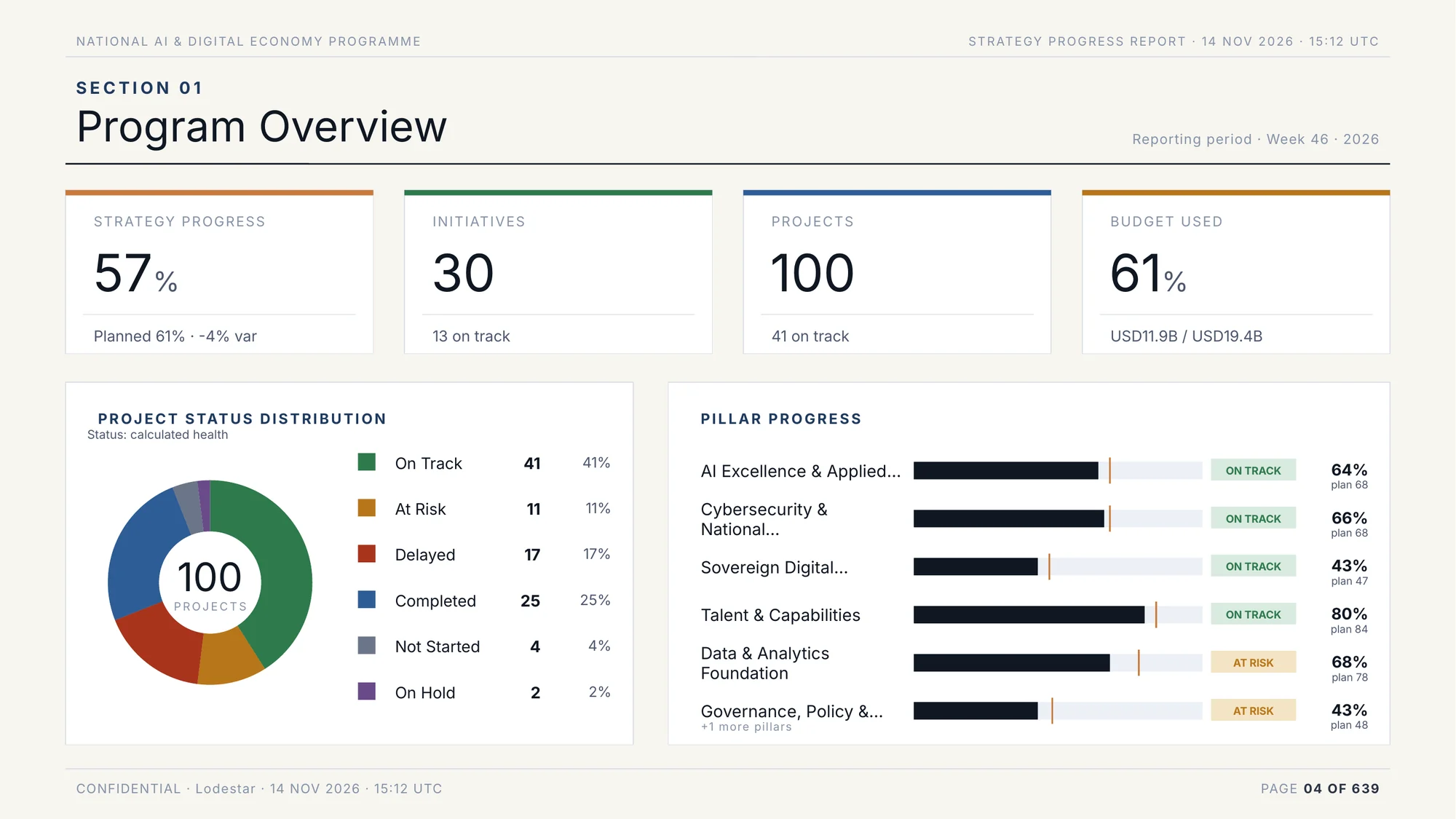
Name the reports the office must produce, and ask for the next one to be generated from your data while you watch. For a strategy PMO that is the board pack. If an analyst would still copy figures into slides afterwards, score it as not done. In Lodestar, the strategy progress report, the KPI scorecard and one-page project deep dives are generated from the live model in the client's own template, as PDF, PowerPoint or Word.
Decide how owners will keep it current
Ask who will keep the record current, and where. Planners already keep schedules in their own tools. Owners answer chat more readily than they log in. A tool that asks everyone to retype an update will be fed last. In Lodestar, Microsoft Project schedules saved as XML and Primavera P6 schedules are imported, and the next import updates the plan in place. In Microsoft Teams, Slack or WhatsApp, the Polaris assistant shows an owner's update as a proposed change, before and after, and nothing changes until the owner presses Apply.
Write the evaluation sheet from the decisions, and the right features follow.
Buy enterprise PMO software on your own data
A demonstration on the vendor's data shows the happy path, and every product has one. The buying process should test fit on yours. Send each vendor the same pack: one real portfolio with its schedules, a year of readings for a few KPIs, your delegation of authority and last quarter's board pack, and ask them to run the moves above on it. Seven tests for strategy execution software sets out what to try in that session.
Then ask for a first stage before the full commitment: one office, one portfolio, a fixed period. Lodestar is configured with each client by a delivery lead and a solution architect, and a pilot on your own data is where we ask buyers to start. Tell us which office is buying.
Questions for your next review
- Which decisions does our office own, and which forum takes each one?
- Whose evaluation sheet are we using, and which office wrote it?
- Where do our KPI targets live today, and who can change one without an approval?
- Which report does the board read, and how much of it is typed by hand each month?
- Which vendor has run our own portfolio and our own delegation of authority in front of us?
Software for a programme office is chosen well when the office knows what it decides. Start from those decisions, and the right tool and the right test of it follow.

Mariia leads commercial and partnerships at Lodestar. Her background is Big Tech and Big Four consulting, where she led large-scale transformations. She holds an MBA from INSEAD.
More from Mariia