↑↓ to moveEnter to openAll results →

    A real scheduling engine under every view your teams use

    Gantt, board, cards and calendar are views of the same activities, with dependencies, float, the critical path and baselines underneath. Move a date and the platform tells you what it costs.
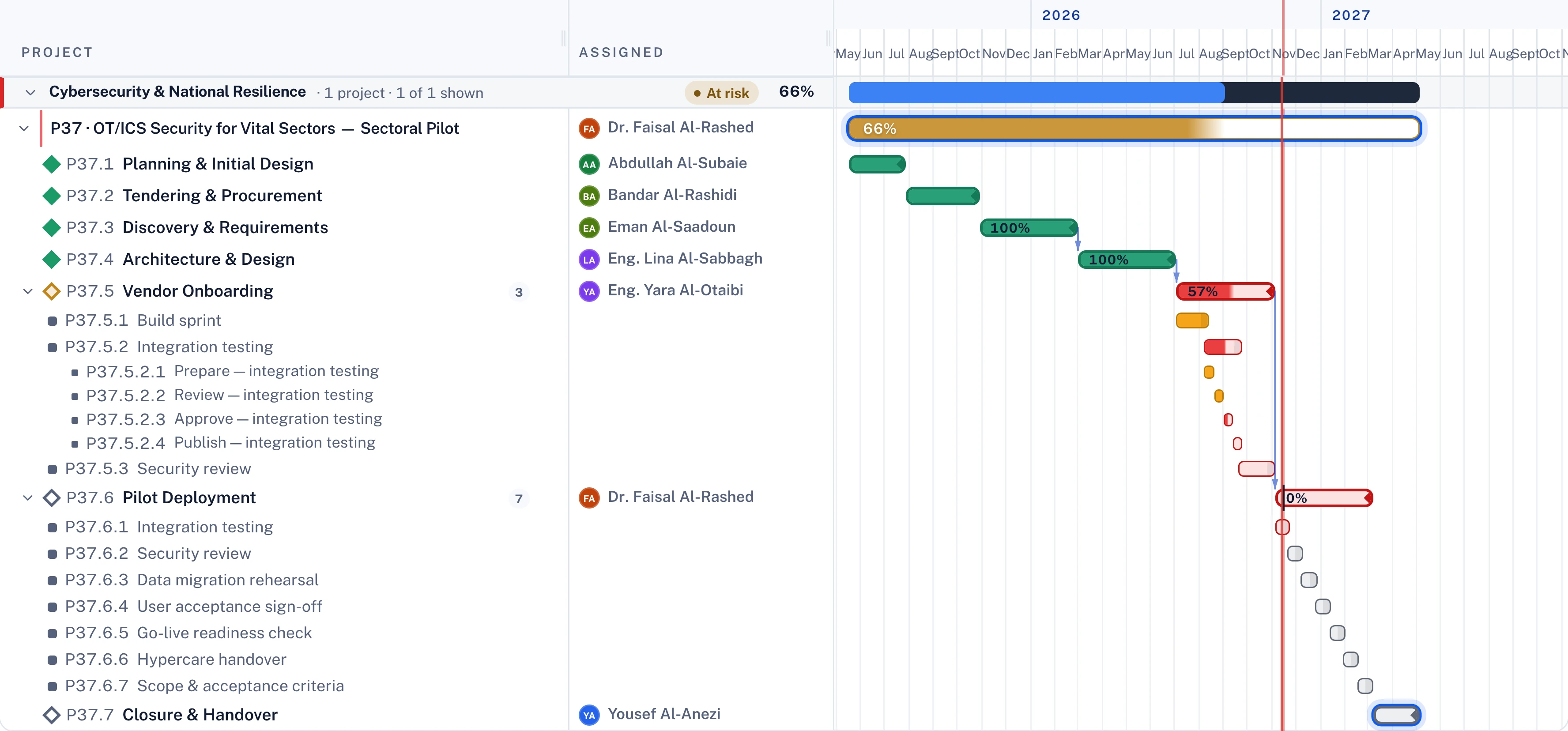
    Project Gantt with activities, tasks and sub-tasks, dependencies and the critical path
    Project schedule. Activities down to sub-tasks, with dependencies and the critical path.

    What usually goes wrong

    And what changes when it runs on one model.

    01

    Plans drift in spreadsheets

    Every team keeps its own version and none of them agree.

    02

    The critical path is a guess

    Nobody can say which slip actually moves the end date.

    03

    Delivery teams will not use it

    A planner's Gantt is not how a delivery team wants to work.

    04

    Knock-on effects come as a surprise

    A late hand-off surfaces in the next project, weeks later.

    The whole estate on one timeline

    Projects, activities and the links between them across the portfolio. Turn on the critical path and everything else dims.
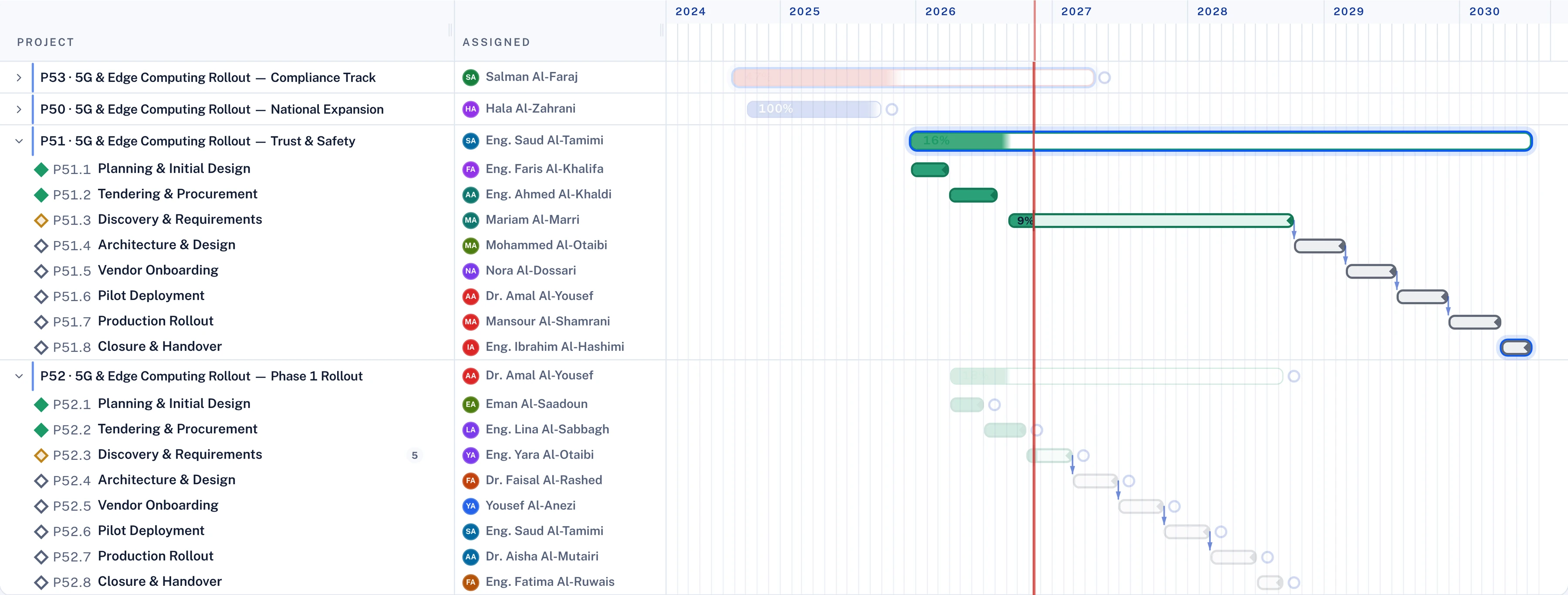
    • Dependencies within and across projects
    • Critical path and near-critical work highlighted
    • Baseline against current dates on every bar
    Portfolio Gantt with several projects expanded and the critical path highlighted
    Portfolio Gantt. Several projects, their activities and the critical chain.

    What a delay really costs

    Pick an activity and a delay, and the engine shows the new end date, the items downstream and the people whose assignments stretch.
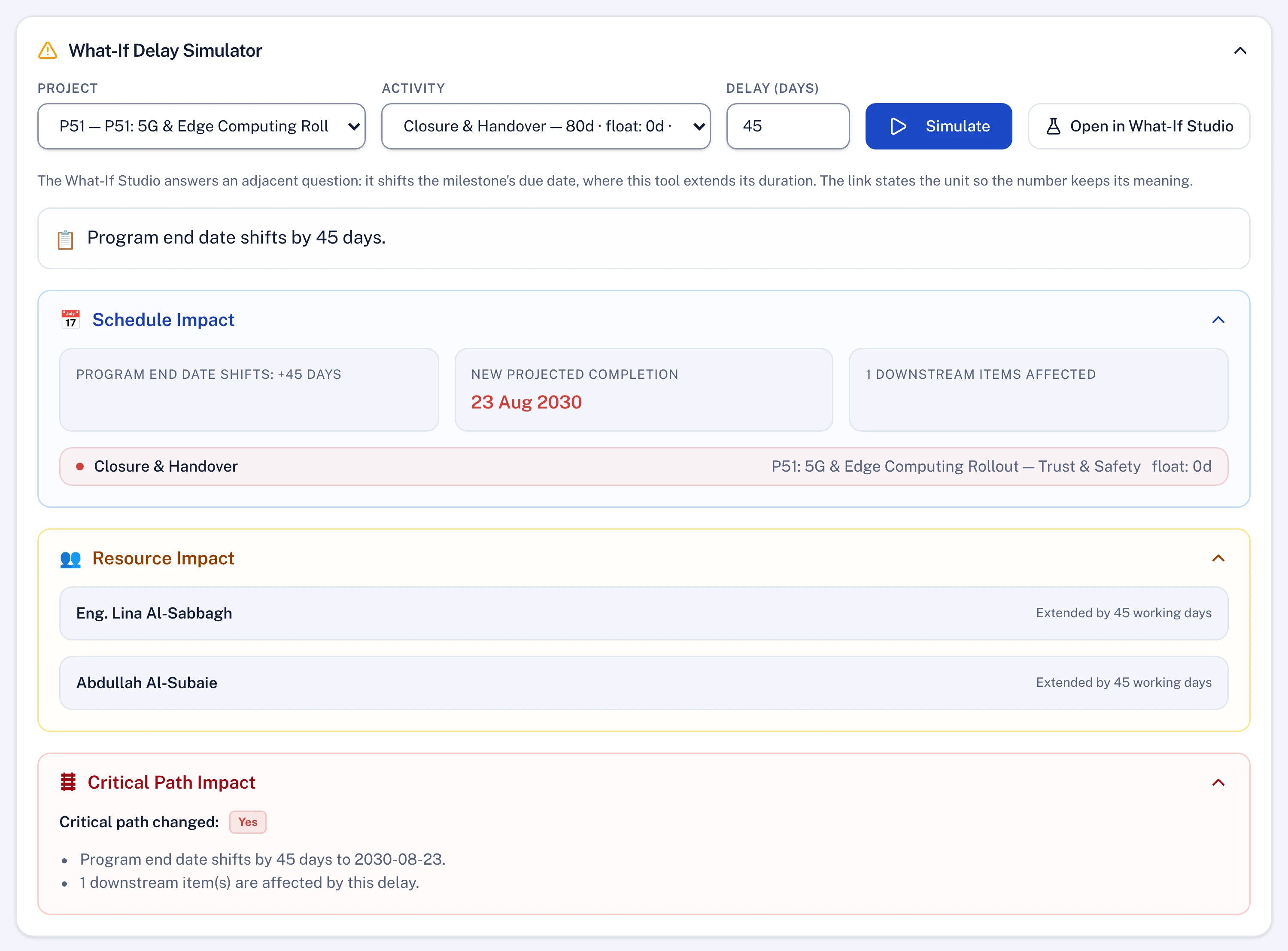
    • End-date impact in days
    • Downstream activities affected
    • People and assignments extended
    Delay simulator showing the new programme end date and resource impact
    Delay simulator. A 45-day slip and what it moves.

    The board view writes to the same plan

    Delivery teams move cards; the schedule moves with them. Status, owners and dates stay in one place.
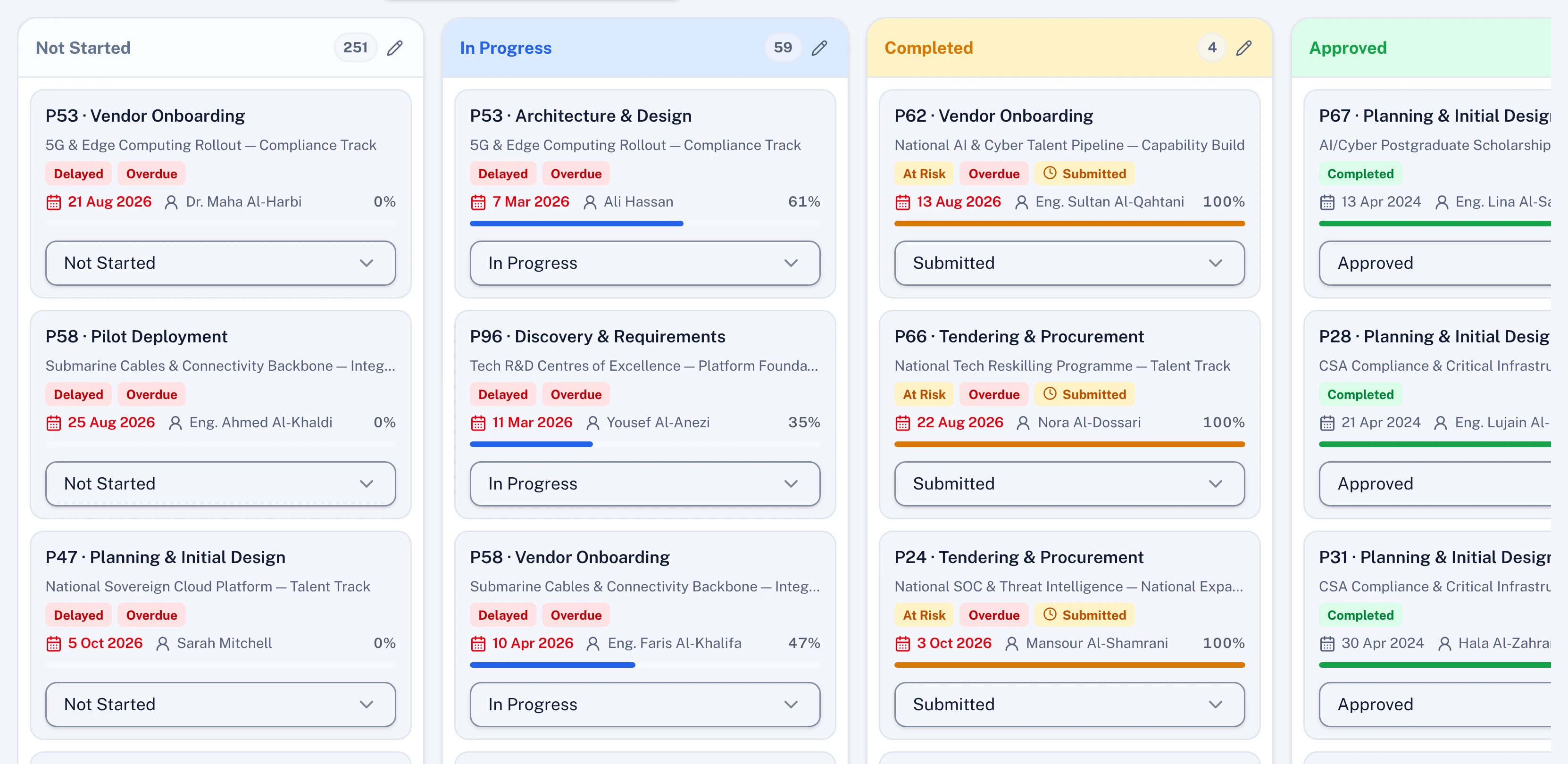
    • Activities, tasks and sub-tasks as cards
    • Approval steps on the cards that need them
    • No re-entry between views
    Project board with activities in Not started, In progress, Completed and Approved columns
    Board view. The same activities as cards.

    Links the plan does not hold yet

    The Dependency Hunter reads tasks, documents and risks and finds dependencies nobody declared, with the end-date impact of each.
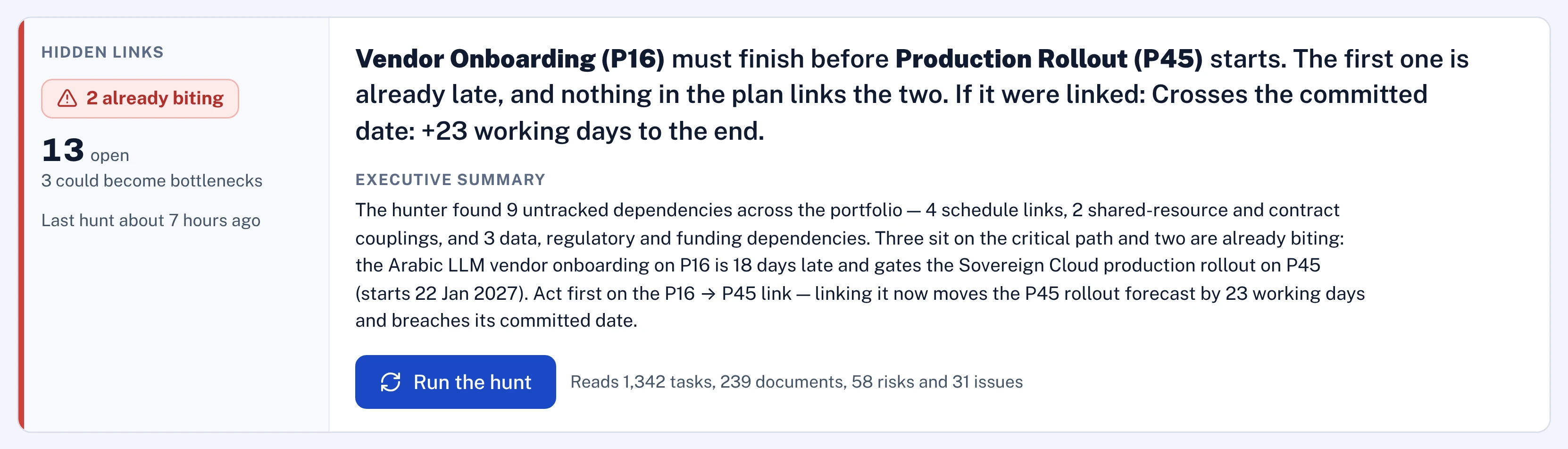
    • Undeclared links found across projects
    • Impact priced in working days
    • Confirm a link and it becomes part of the plan
    Dependency Hunter summary: a hidden link between two projects and its impact on the committed date
    Hidden links. A dependency nobody declared, and what it does to the date.

    What you get

    Every item runs on the same engines the screens use.

    Critical-path engine

    Float, lag and dependency maths on every activity.

    Baselines

    Frozen baselines with variance and a governed re-baseline.

    Four views

    Gantt, board, cards and calendar on the same activities.

    Imports

    Microsoft Project, Primavera P6, Excel, Jira, Asana and more.

    Delay simulator

    Any slip priced in days before anyone commits.

    Dependency Hunter

    Undeclared links found and proposed for confirmation.

    Polaris in planning and scheduling

    The advisors and agents that work in this part of the platform. All agents

    Dependency Hunter

    Proposes

    Finds dependencies nobody declared across tasks, documents and risks, and prices each one in days.

    Reads
    Tasks, documents, risks
    Produces
    Links to confirm, with impact

    Update extraction

    Proposes

    Reads a field report or weekly update and turns it into progress, dates, risks and resource gaps on the plan.

    Reads
    PDF, Word, Excel, PowerPoint or text
    Produces
    Proposed plan changes for review

    Import analysers

    Proposes

    Maps Microsoft Project, Primavera and Excel files onto the model when you bring a plan in.

    Reads
    Schedule and spreadsheet files
    Produces
    A mapped plan to confirm

    Scenario planner

    Proposes

    Builds alternative plans for a goal you set and compares them against the current plan.

    Reads
    The plan, a goal and constraints
    Produces
    Scenarios to compare and adopt

    Questions

    Do our schedulers have to give up Microsoft Project or Primavera?

    No. Lodestar imports Microsoft Project and Primavera P6 files, so schedulers can keep their tools while the portfolio, KPIs and governance run in Lodestar.

    Is the Gantt drawn or calculated?

    Calculated. Dates, float and the critical path come from the scheduling engine, and every view writes to the same activities.

    Can we see the impact of a change before saving it?

    Yes. The delay simulator and What-If Studio run the engine on a copy, and nothing changes until a person applies it.

    See it on your own programme.

    Send us a slice of your portfolio and we load it before the session, from strategy down to task.