Governed, AI-native strategy execution,
strategic programme and performance management.
From board targets to this week's tasks, every number in Lodestar is backed by evidence, challenged by Polaris and approved by the right authority under your own governed workflows. Polaris, its AI advisory board, reads the whole programme, flags what needs a decision, and changes nothing without a person's approval.
Programme truth is scattered across a dozen files.
This is how most strategic programmes run today. Every file was right on the day it was saved, and none of them talk to each other.
"Can anyone confirm the Phase 2 date before Thursday's SteerCo? The deck still shows March."
Illustrative. A typical programme estate. The dashed lines are people moving numbers from one file to another.
And behind every one of those files is a person rebuilding it by hand.
Give strategy, transformation and the PMO back their week.
The same six steps and the same people. What changes is the handoff between them.
"I wait for the team to assemble everything by hand from stale slides."
"I open a live dashboard. Nobody assembles slides for me."
"I rebuild the plan by hand, then lose track of where it is heading."
"The plan lives on one scheduling engine. No versions drift in spreadsheets."
"My week is chasing updates across five tools."
"I reply to one email. The platform updates the plan and chases the approvals."
"I track benefits in a sheet nobody links to delivery."
"Every KPI is wired to the initiatives that move it."
"I lose nights rebuilding the board pack by hand."
"The board pack builds from the same live numbers."
"I see problems when they land, not before."
"I see a slip coming while there is still time to act."
Most tools cover a slice. Lodestar covers the whole span.
Schedulers plan, work tools track tasks, workflow tools route approvals, OKR platforms hold targets and BI tools report afterwards. The manual work lives in the gaps between them.
Every steering committee asks the same three questions.
Most programmes answer them from spreadsheets, slide decks and email threads that disagree with each other. Lodestar answers them from one record.
Are we on track, and why?
Today"Nobody is quite sure. Give us a few days."
With LodestarStatus is computed from dates and approved evidence, so the answer is on the dashboard before the meeting starts.
What is coming, and where will it hit?
TodayThe warning sits in a risk log nobody opens until the committee meets.
With LodestarA slipping task turns its pillar amber the day it slips, and the forecast shows the new finish date.
What should we do about it?
TodayWait for next month's deck, or call the consultants.
With LodestarPolaris proposes a specific move, you test it in a sandbox, and the approved change is written to the plan with an audit trail.
One model underneath every view.
The strategy map, the schedule, the budget and the board pack all read the same numbers, so a report can never disagree with a dashboard. Choose an area to see it.
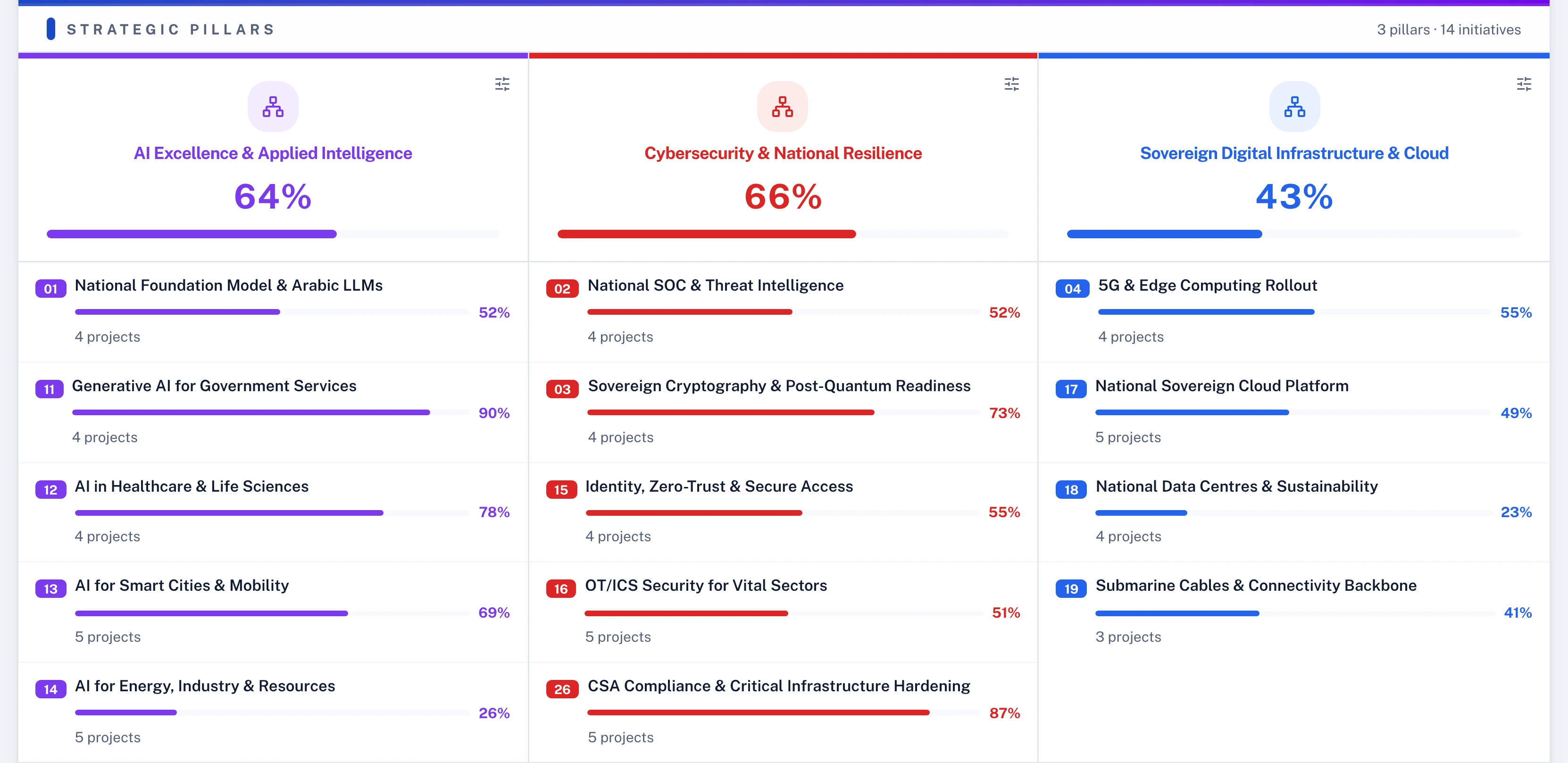
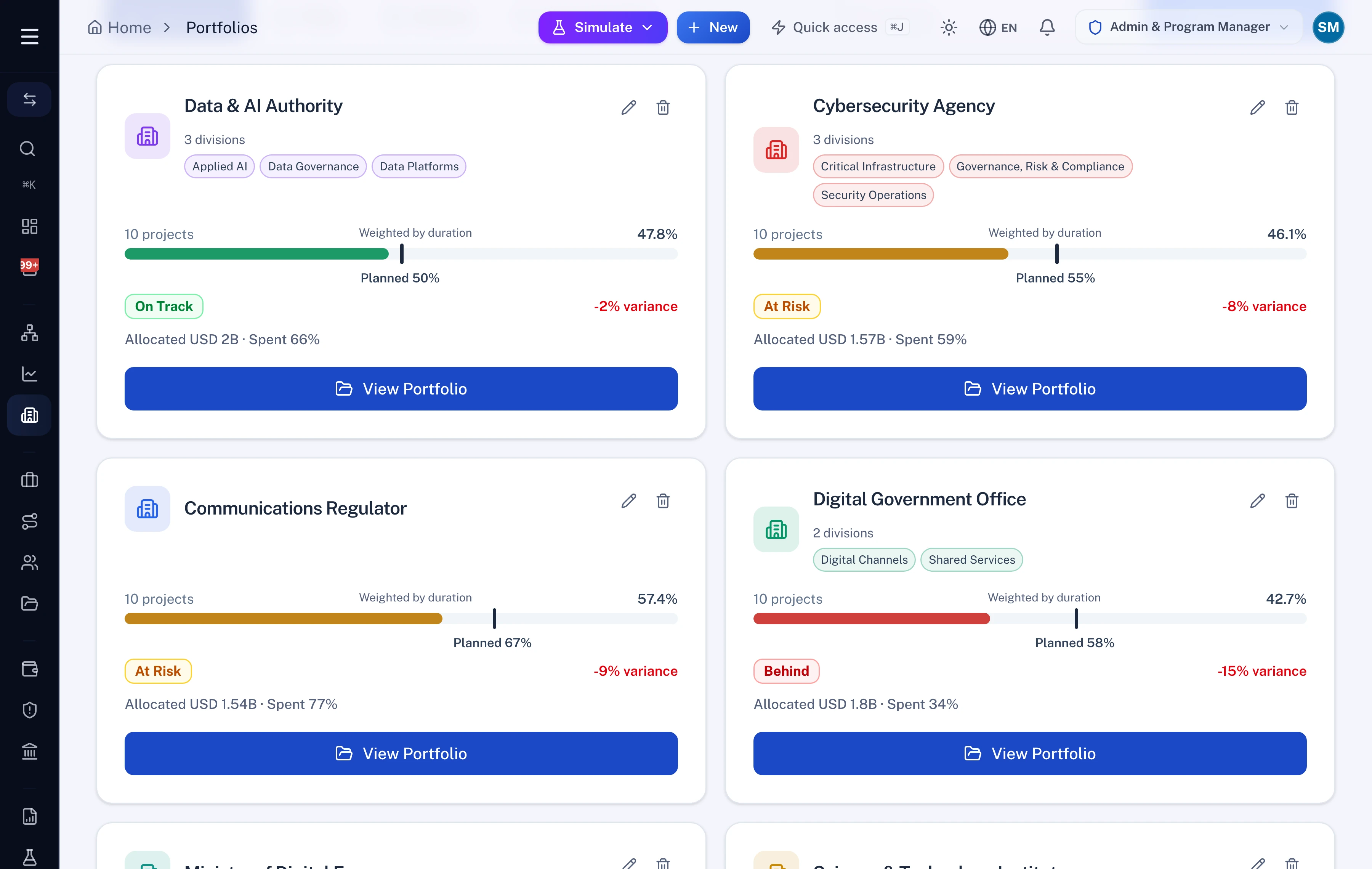
Every pillar, and every initiative that rolls up into it.
Pillars, initiatives, projects and KPIs sit in one model, so the question "what is this project for" always has an answer.
- Progress rolled up from approved work
- Projects that serve no initiative, listed
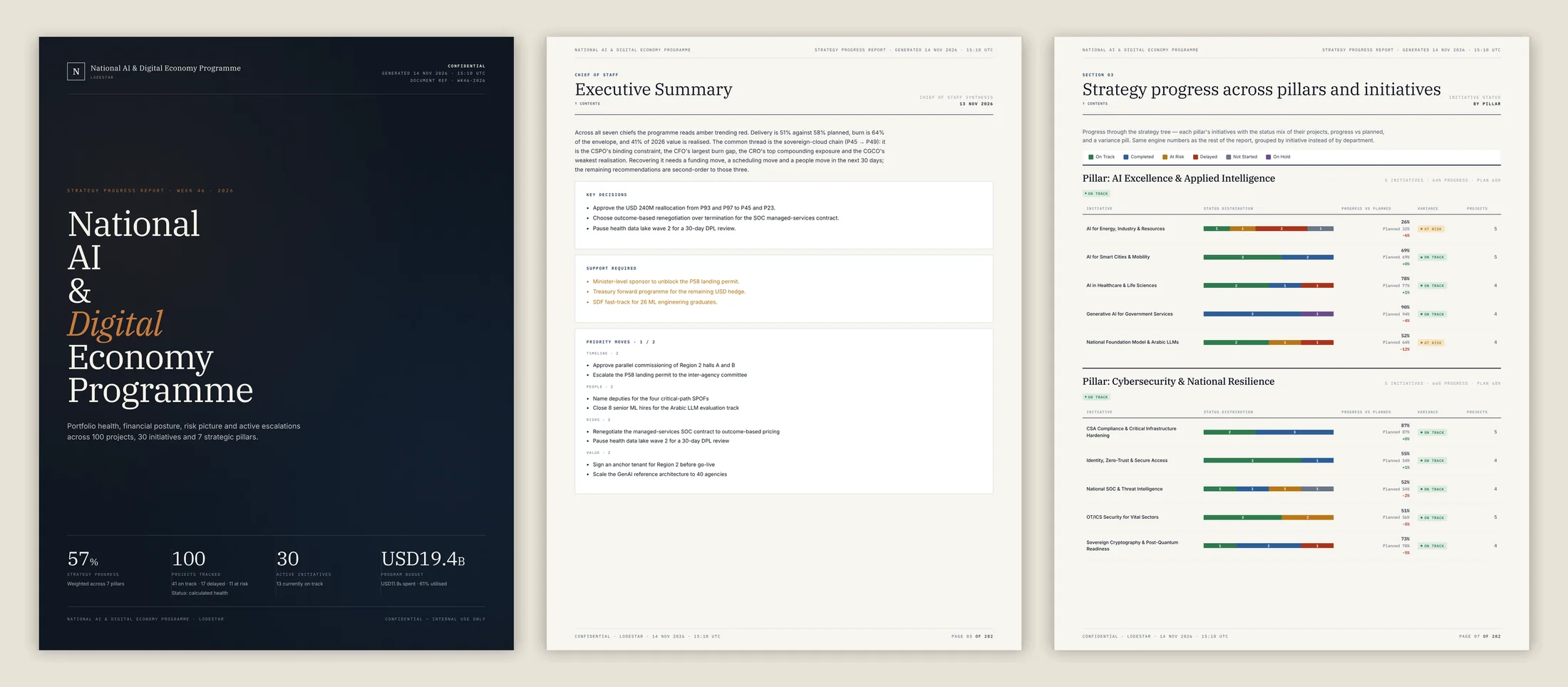
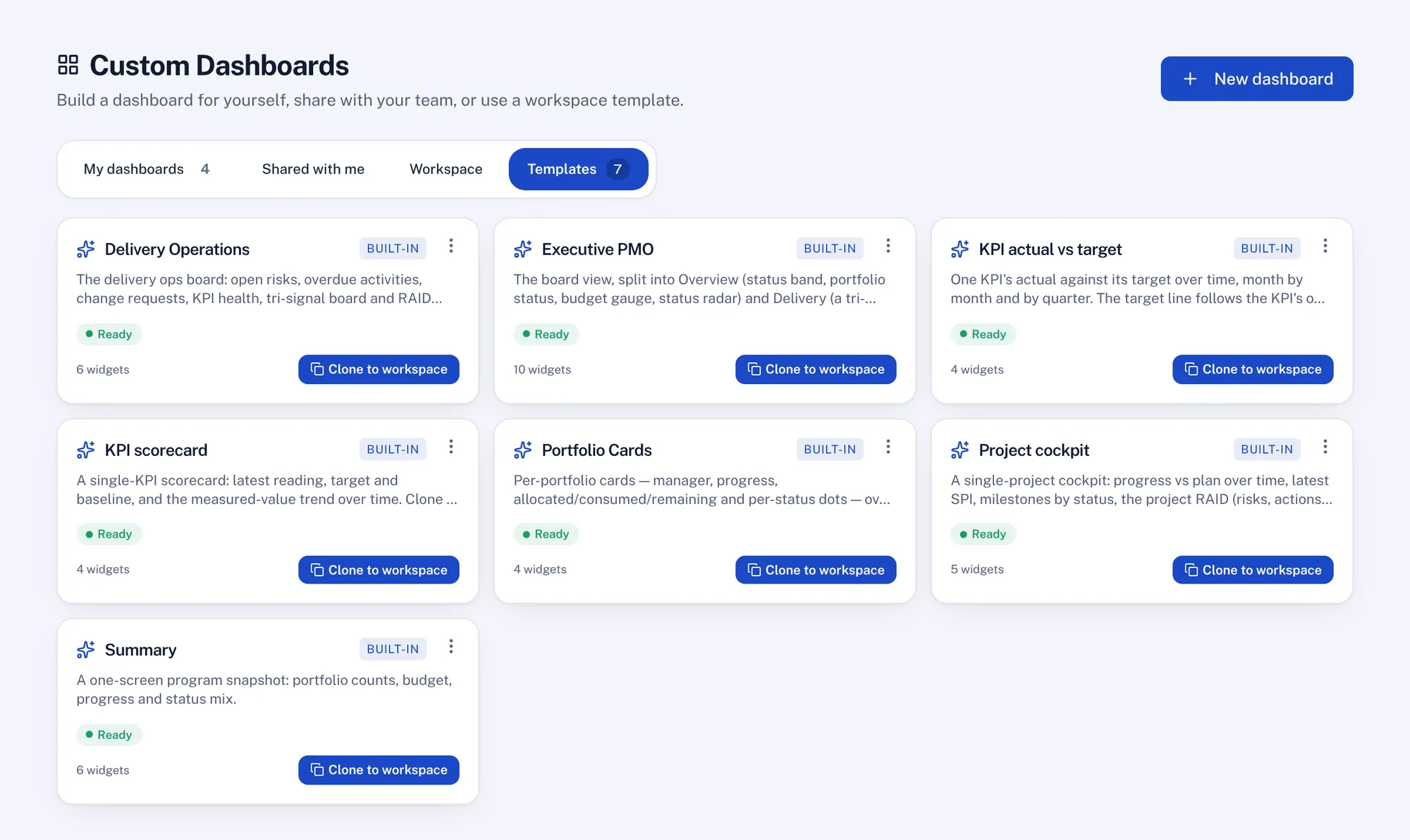
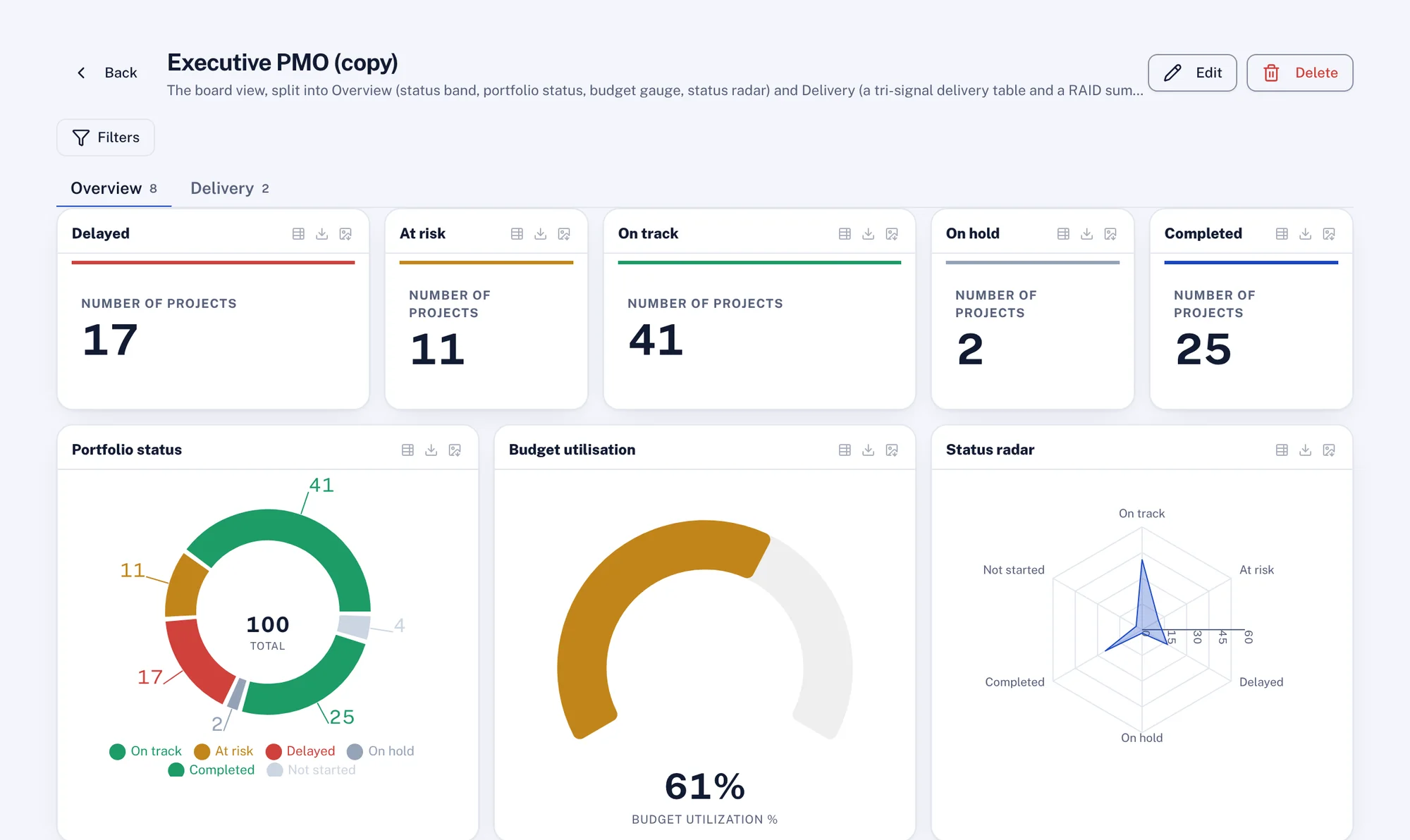
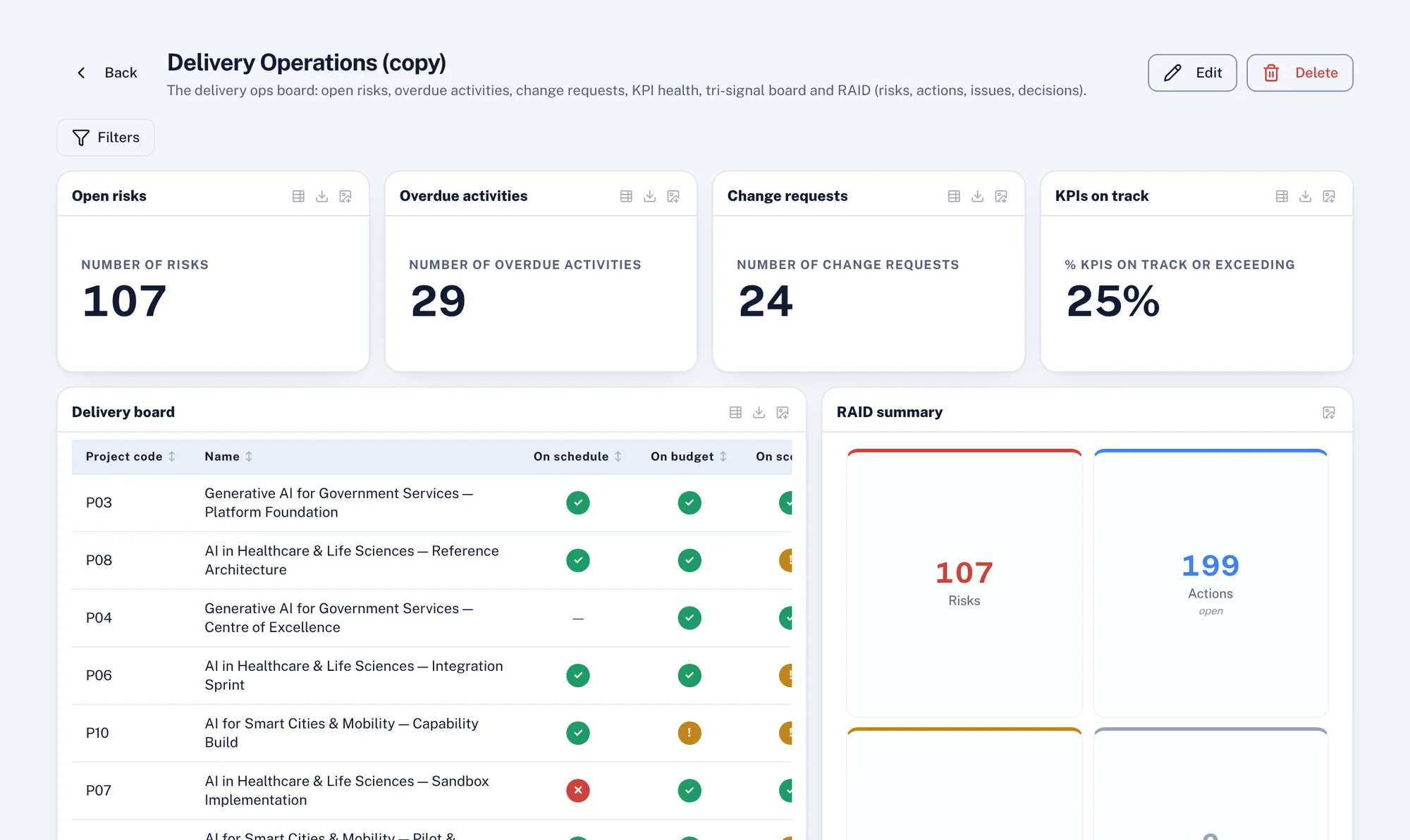
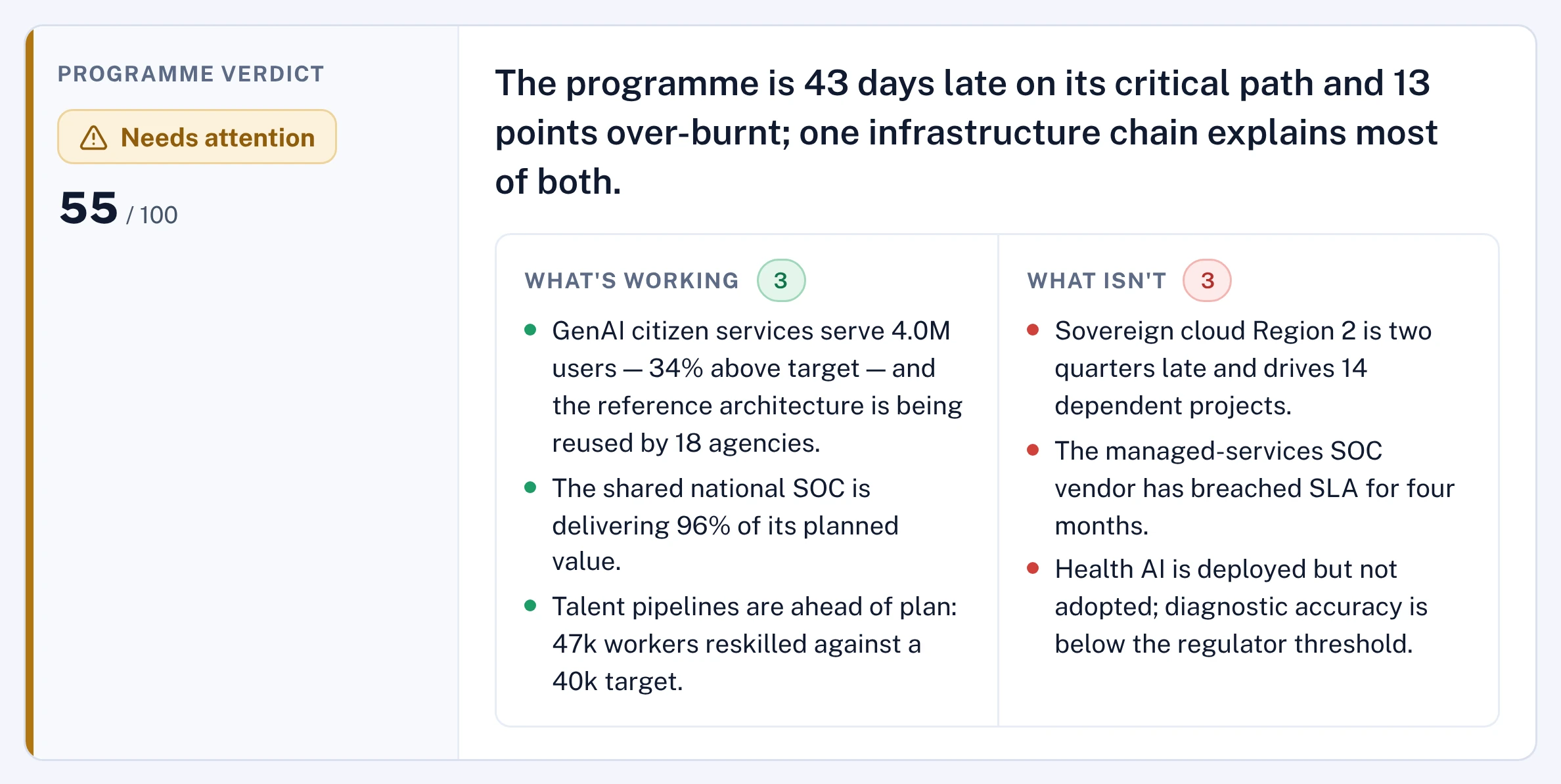
An advisory board that has read the whole programme before you sit down.
Seven AI chiefs each read the programme from their own seat every cycle. A Chief of Staff reconciles them into the one brief leadership acts on.
- FinancialOverruns, burn ahead of progress, forecast breaches.
- Strategy and planningWhether the portfolio still serves the strategy.
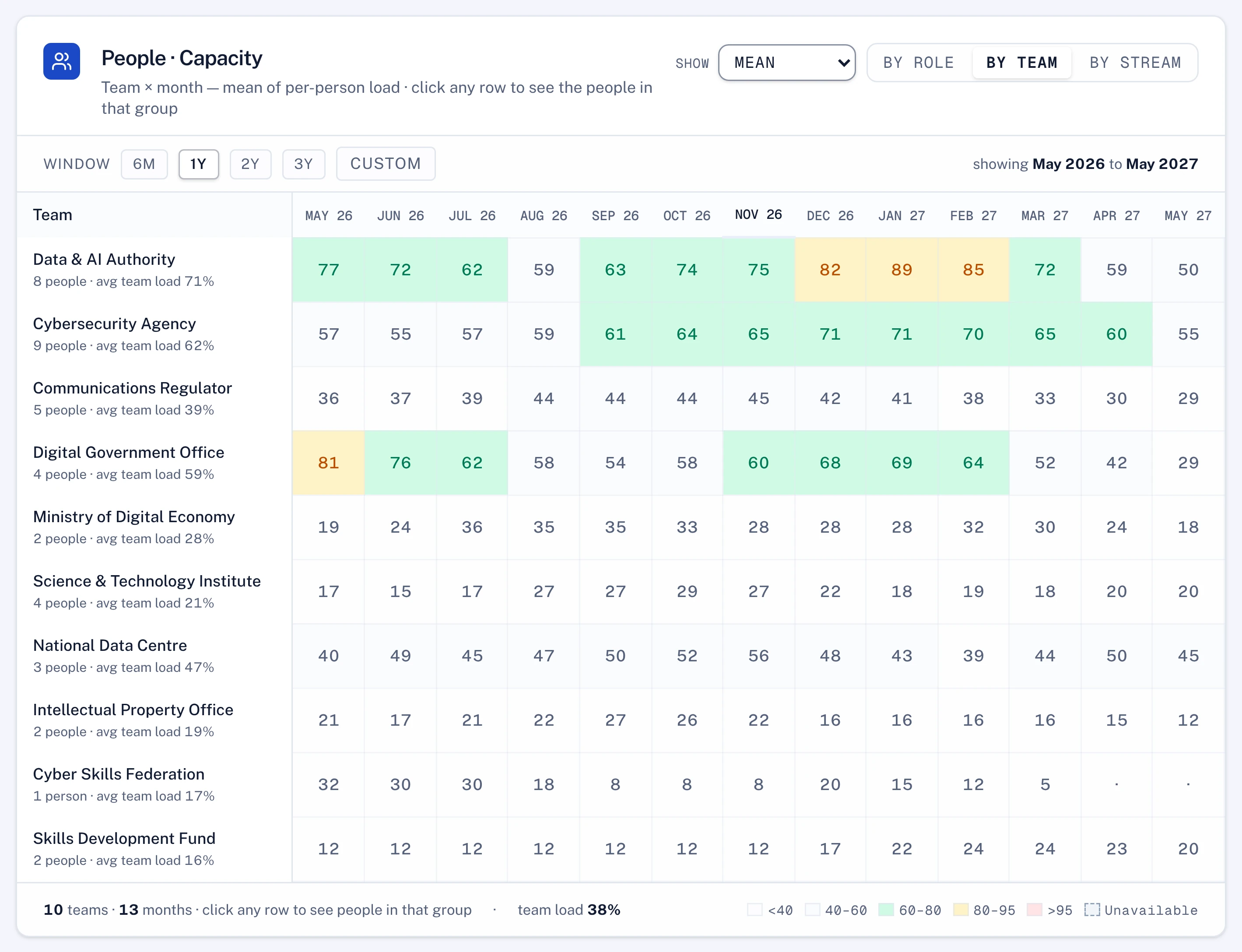
- PeopleCapacity and key-person risk before a date slips.
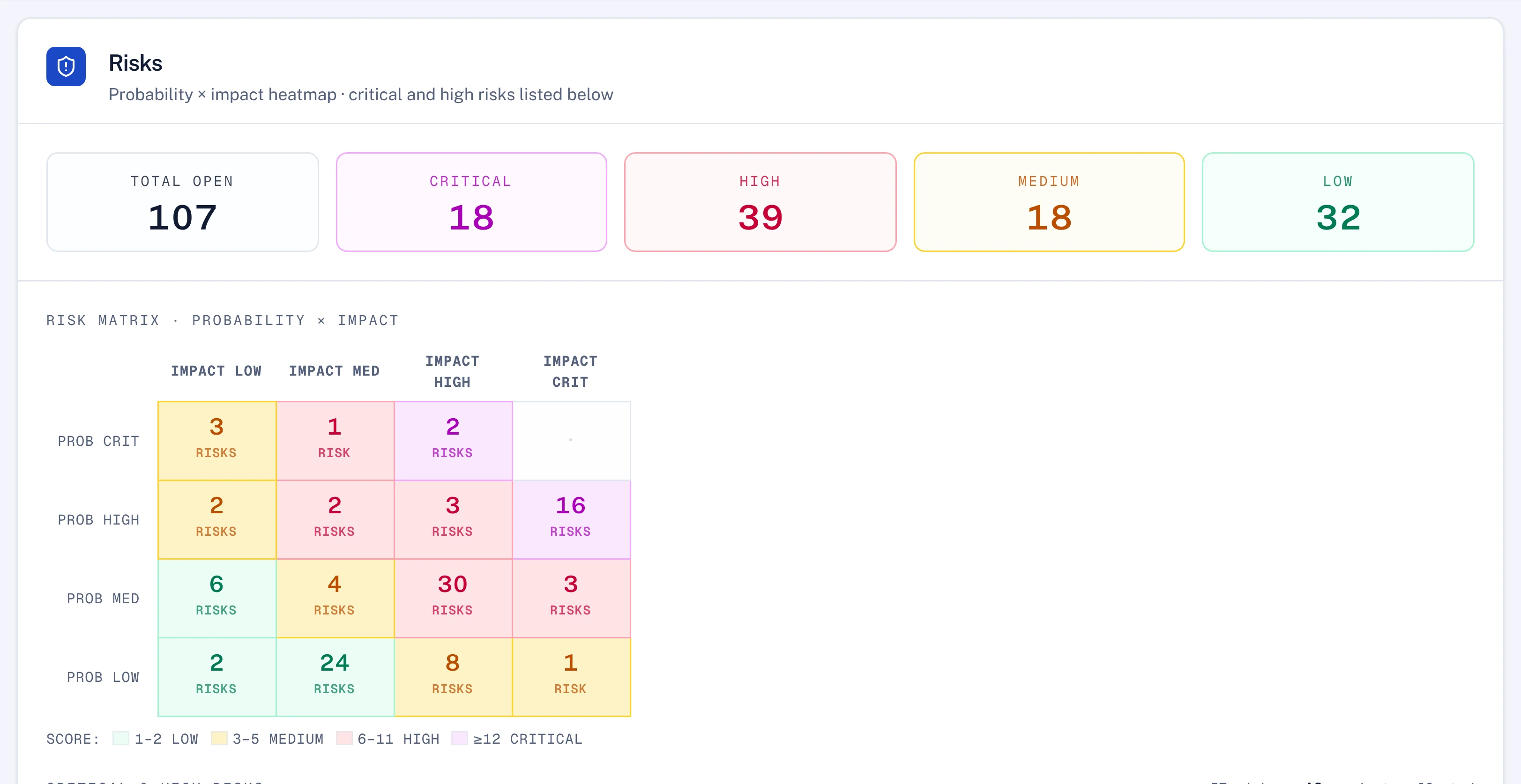
- RiskExposures that threaten delivery, mitigations that stalled.
- PerformanceWhich greens to believe, and quiet performance drift.
- CommercialBenefit slippage and value at risk.
- DigitalIntegration risk and tech debt on the delivery path.
- Chief of StaffReads all seven and writes the single page.
Ask it a question, or hand it the work.
Polaris answers from the live model, with the records behind every figure. Give it a field report and it proposes the plan updates; give it your template and it builds the board pack. Nothing changes until you approve it.
How is the $2.3B portfolio split, and where is the risk concentrated?
41 initiatives, $2.3B committed across six pillars. Two pillars hold half the money and most of the trouble.
| Pillar 1, Digital core | $620M | 27% |
| Pillar 2, Infrastructure | $520M | 23% |
| Pillar 3, Services | $410M | 18% |
| Pillar 4, Capability | $330M | 14% |
| Pillar 5, Regulatory | $250M | 11% |
| Pillar 6, Enabling | $170M | 7% |
At ledger level, four initiatives carry the whole variance. P14 and P25 alone account for $87M of the $112M forecast breach.
| Initiative | Forecast | Variance | Status |
|---|---|---|---|
| P14 National Foundation Model | $412M | +$56M | 121 days late |
| P25 National SOC | $268M | +$31M | 90 days late |
| P44 Sovereign Cryptography | $150M | +$12M | 46 days late |
| P90 National AI Standards | $96M | +$9M | 28 days late |
| P07 Data Exchange Layer | $74M | -$4M | On plan |
Update P14's status from this field report.
I read the report. These are the changes I would make to P14. Nothing is saved until you approve them.
| P14 National Foundation Model | Now | Proposed |
|---|---|---|
| Progress | 41% | 48% |
| Model training, finish | 30 Sep | 14 Oct +14 days |
| New risk | None | GPU delivery delayed, high |
| Status note | Last week's | Cluster commissioned; training starts late |
Applied to P14 and recorded in the audit log with you as the approver. The finish date moved 14 days, so I flagged P25, which depends on it.
Now build Thursday's board pack from this thread, in our template.
Nine slides in your board template, built from this thread and the P14 update. The charts stay bound to their records, so the pack refreshes every cycle.
Illustrative. A scripted thread on sample data. In your workspace Polaris works with your permissions, and every change it proposes waits for a person to approve it.
It connects to the tools you run and the AI you already use.
Lodestar speaks MCP, the open standard for connecting AI to software, in both directions.
- Inner ring: your AI assistants
- Claude, Microsoft 365 Copilot, Cursor or any assistant that supports MCP can ask Lodestar about the portfolio. Each person gets only what they are allowed to see.
- Outer ring: your tools and data
- Built-in connectors for planning, scheduling, finance and collaboration tools, and MCP for anything else that offers an MCP server.
 MS Project
 Teams
 Primavera P6
 monday.com
 Excel
 Slack
 SharePoint
 Copilot
One programme, seen from every seat.
The same model and the same evidence. Each person opens it to the questions their own job asks.
The decisions that need you, and the proof behind every green.
One page a week: what moved, what is at risk and what is waiting for your signature. Each line traces back to evidence approved by the right authority.
- A Chief of Staff brief reconciled from seven AI advisors
- Every status backed by approved evidence
- Approvals routed to you by value, with a named delegate when you are away
- A board pack built from the live numbers
- Three decisions are waiting for you: two budget changes and one stage gate3 to decide
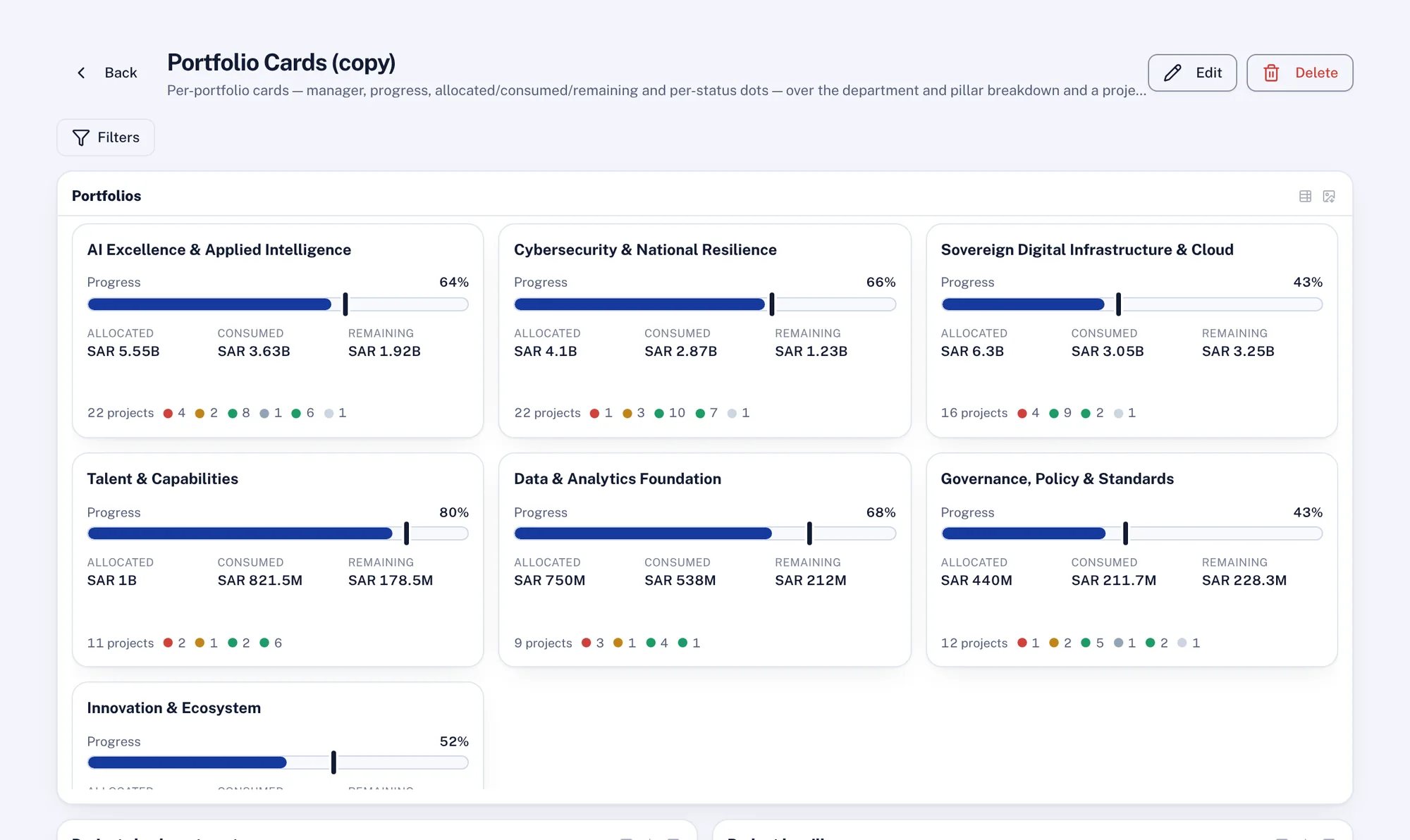
- Programme at 64% against 68% planned; two pillars are behind4 pts behind
- Benefits: USD 41m realised of USD 120m planned this year34%
Illustrative figures from a demo workspace.
Run the portfolio without rebuilding the report every week.
Owners update by replying to an email or in Teams, Slack or WhatsApp, and you approve the change. The roll-up, the reminders and the board pack come from the same model.
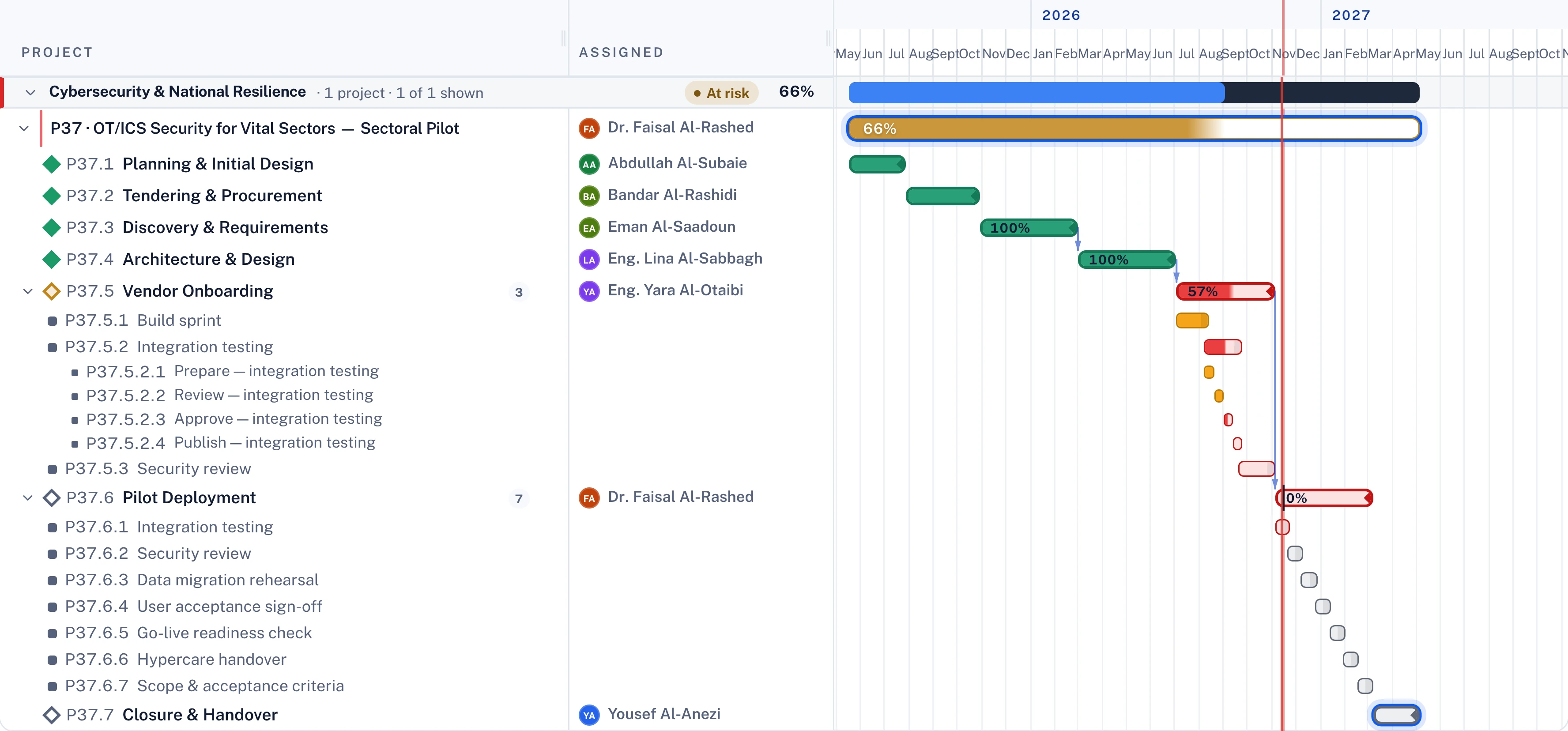
- Dependencies and the critical path across the whole estate
- Approvals that escalate on their own when they wait too long
- Capacity by team and month, before a date slips
- Updates collected by Polaris, approved by a person
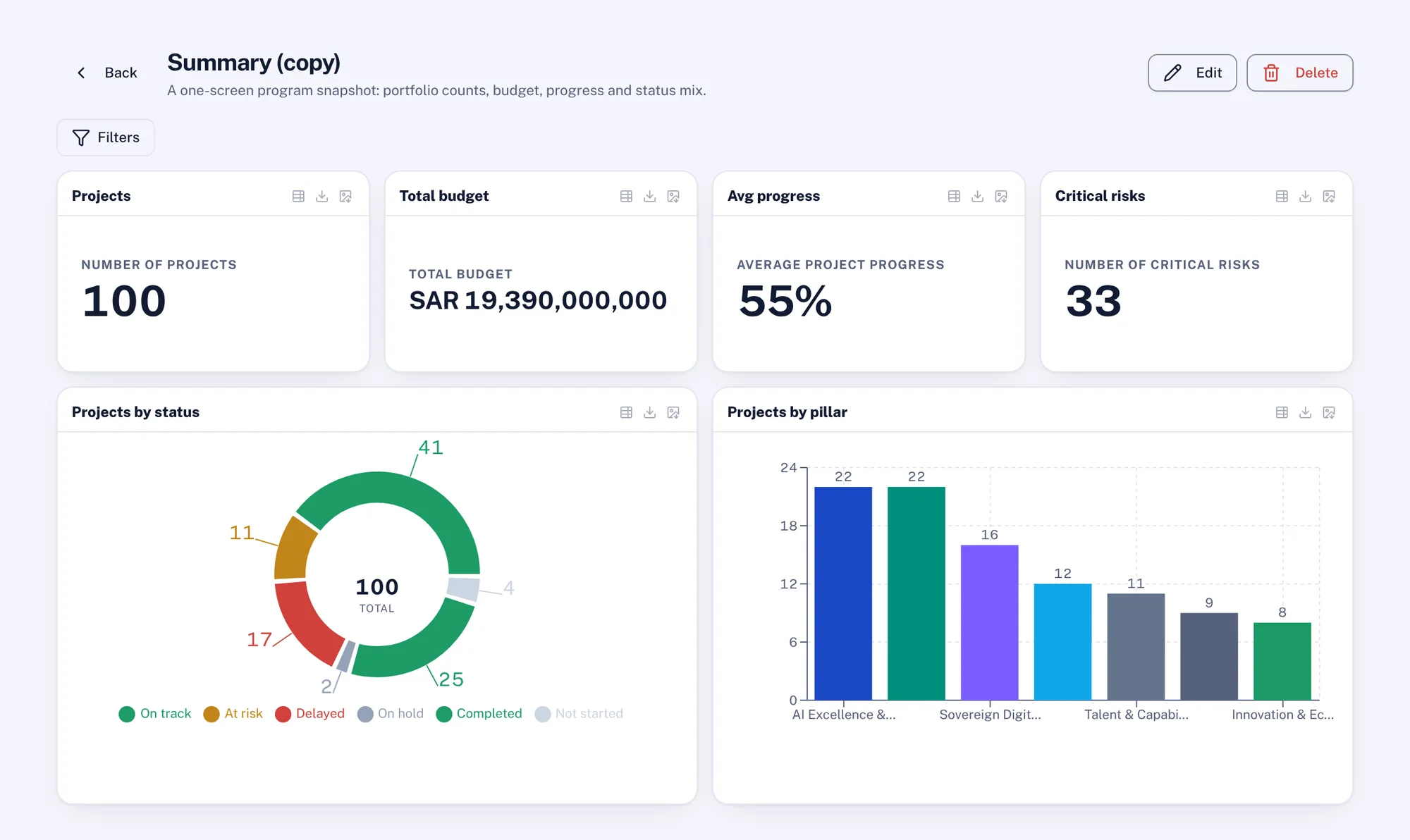
- 100 projects: 71 on track, 19 at risk, 10 delayed100 live
- Seven approvals are past their deadline and have gone to sponsors7 late
- Twelve weekly reports are missing; reminders went out this morning12 due
Illustrative figures from a demo workspace.
See whether the work is still moving the strategy.
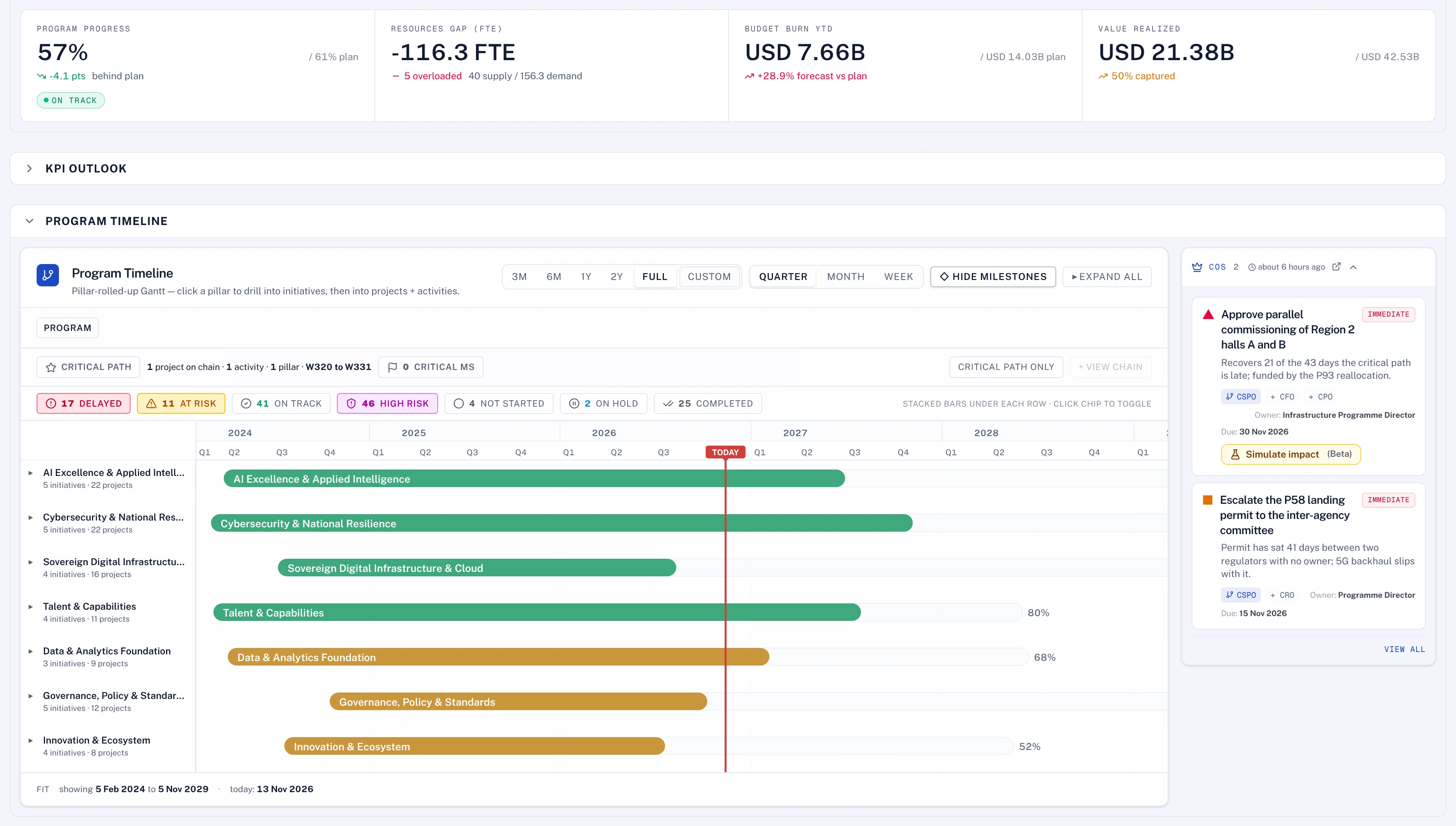
Pillars, initiatives, projects and KPIs in one model, so the question "what is this project for" always has an answer.
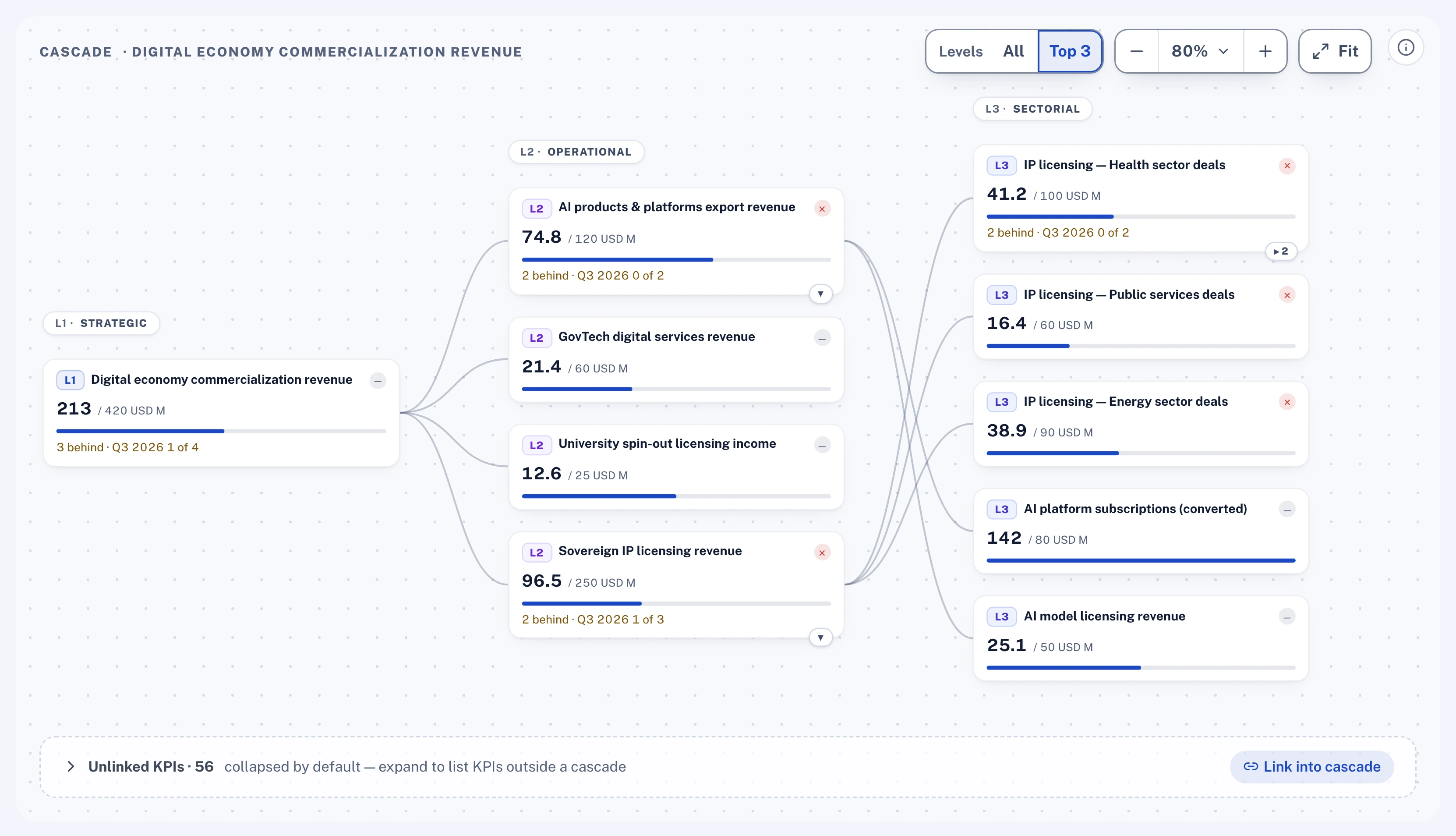
- A KPI cascade from the board target to the team
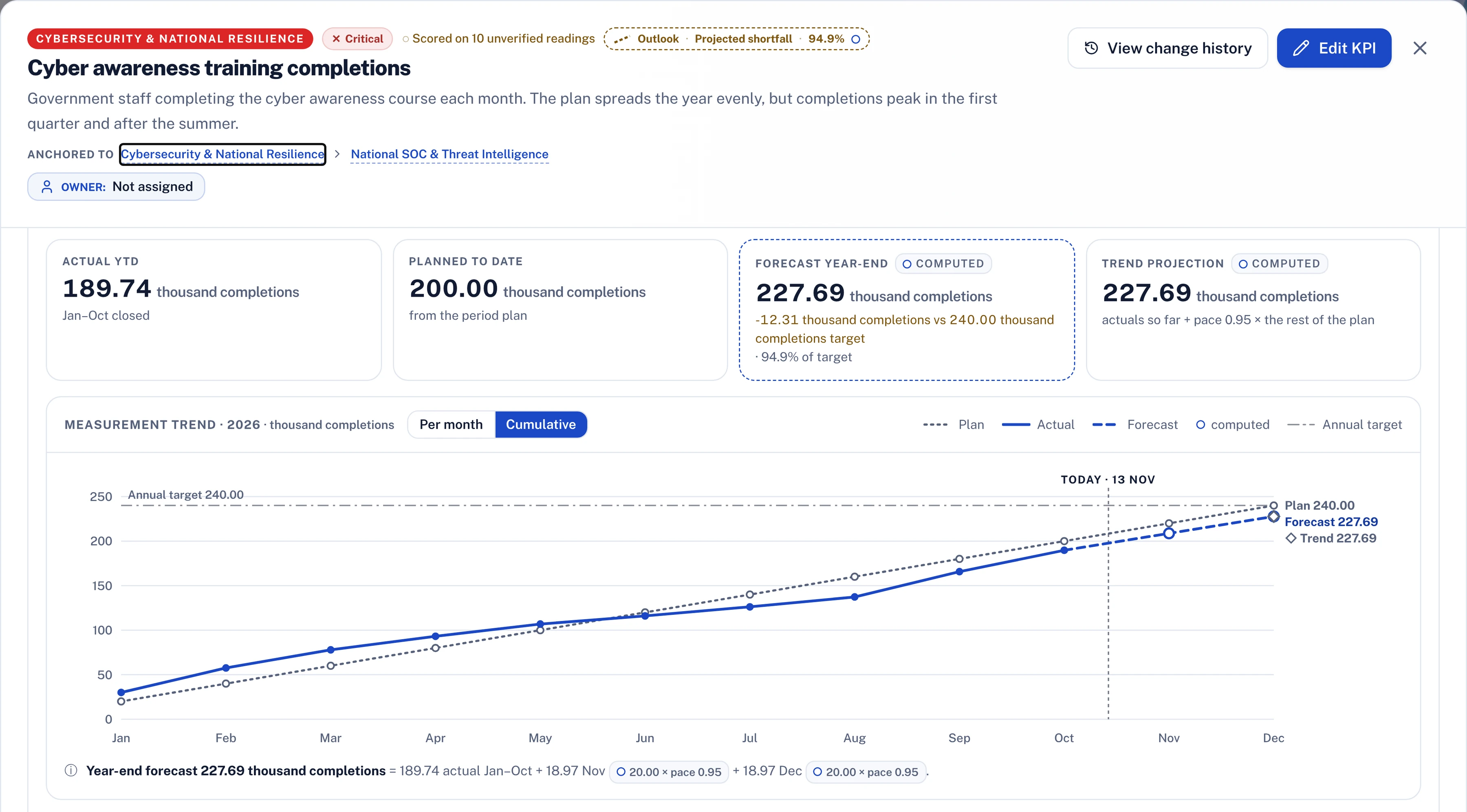
- Plan, actual and forecast on every KPI
- Readings that count only once their evidence is verified
- Projects that serve no initiative, listed
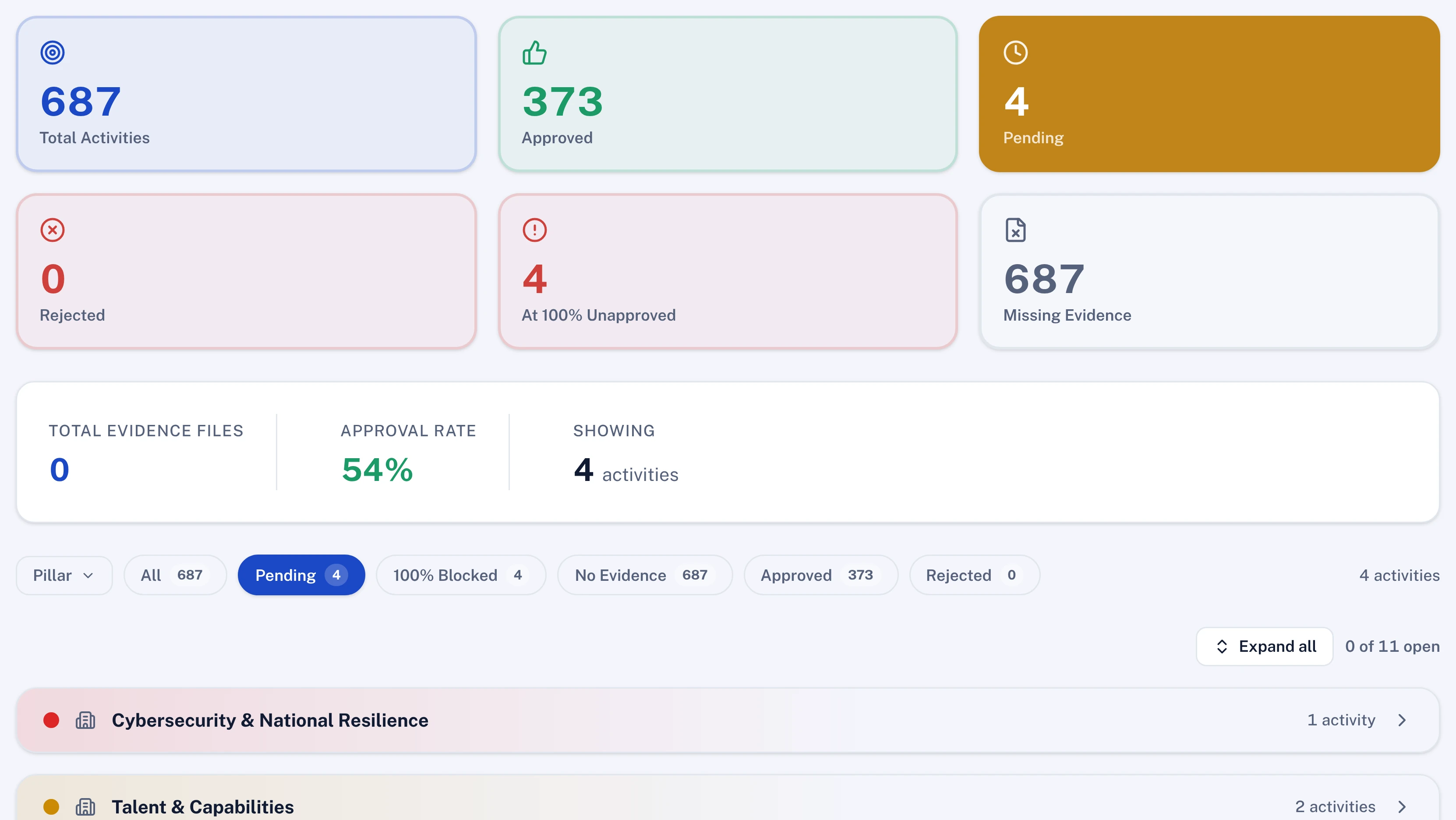
- Five pillars, 30 initiatives: two pillars are behind plan2 behind
- 50 KPIs: 38 on track, 8 at risk, 4 critical50 KPIs
- Six projects are linked to no initiative6 unlinked
Illustrative figures from a demo workspace.
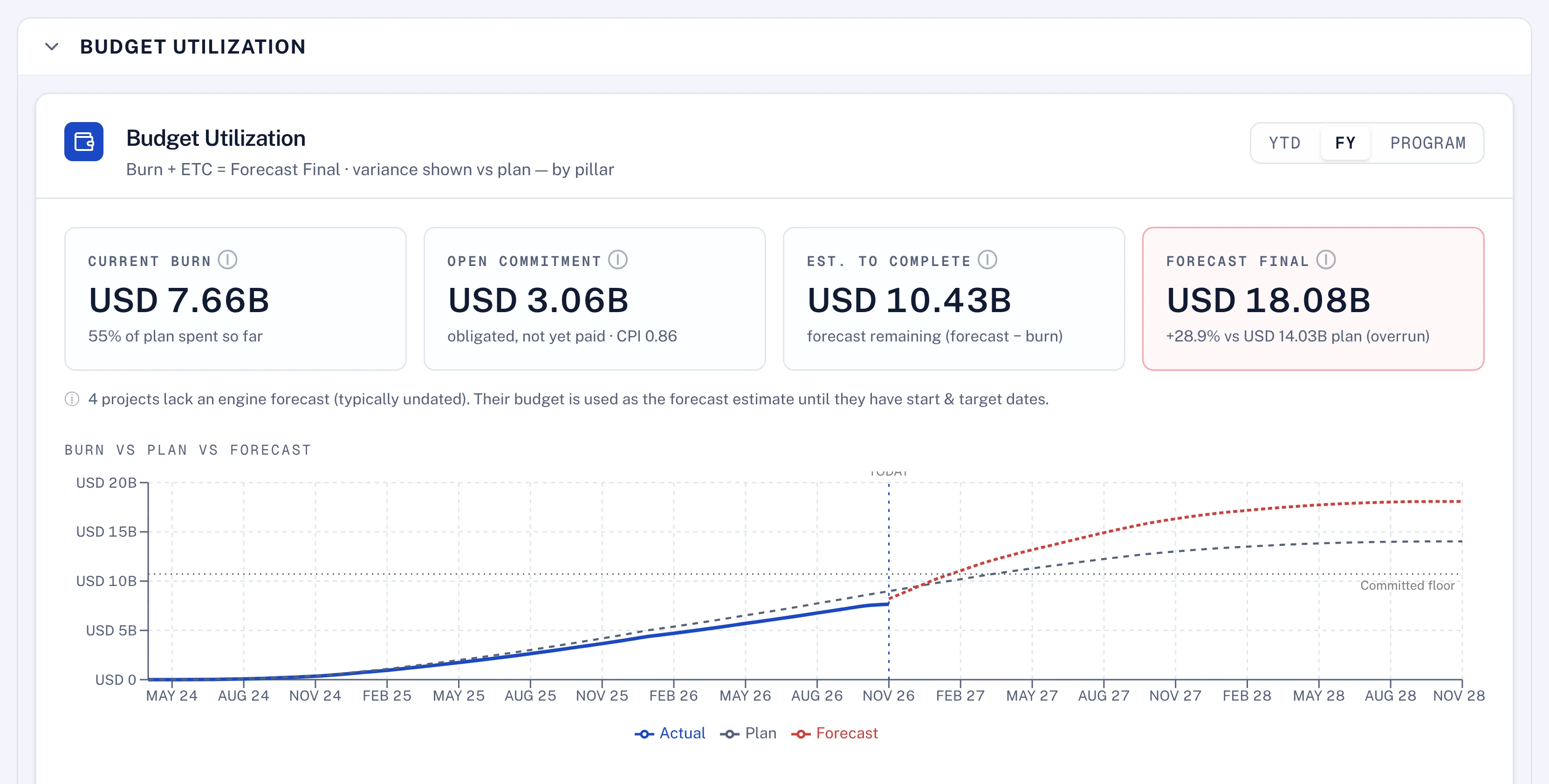
Know what is committed, what is spent and whether it is still worth it.
Budget, contracts and invoices sit on the project they belong to, beside its progress. A change above your threshold comes to you before it happens.
- Allocated, committed and spent, reconciled per project
- Budget changes routed by value under your delegation of authority
- Burn against progress, flagged when they part
- Benefits tracked after go-live
- USD 412m allocated: 58% committed, 41% spent41% spent
- Four projects are spending ahead of their progress4 flagged
- Two budget changes are waiting for your approval2 to approve
Illustrative figures from a demo workspace.
Update once, and be believed.
Report progress with the evidence attached, by email, in chat or in the app. There is no second spreadsheet for the PMO.
- One list of what is due from you this week
- Reply in Teams, Slack or WhatsApp; Polaris drafts the update and you confirm it
- Evidence attached once, reused in every report
- A clear view of what is waiting on someone else
- Four updates are due this week; one is overdue4 due
- Milestone "Site handover" is with the reviewer, evidence attachedIn review
- Your change request is with Finance, step 2 of 3Step 2 of 3
Illustrative figures from a demo workspace.
Built for the people who run large programmes.
Eight solution pages, each written for the team that runs that kind of programme.
Questions buyers ask us.
Straight answers, by area. If yours is not here, ask us
Does the AI approve anything?
No. Polaris reviews the evidence and explains what supports the claim and what does not. The decision stays with the approver, and the requester can never be their own approver.
Can our delegation of authority be configured?
Yes. Approval routes, value thresholds, committees, deadlines and escalation are set in Workflow Studio without code, and the route is frozen when a request is submitted.
What stops someone replacing a file after approval?
Approved evidence is frozen as a hashed copy and cannot be deleted. A new version starts a new approval.
Is the audit trail tamper-evident?
Yes. The audit and decision logs cannot be edited or deleted at the database level, and each entry is chained to the one before it, so a gap or change can be detected.
Can we keep our own KPI framework?
Yes. Levels, units, cadence, scoring rules and the cascade structure are configured, not coded, so your framework becomes the working system.
Where do the actual readings come from?
Owners enter them, or they arrive from connected systems such as the finance system. Either way each reading carries its source and its evidence.
How is the forecast calculated?
From the readings so far and the plan for the remaining periods. Owners can also enter their own forecast, and the two are shown side by side.
Do our schedulers have to give up Microsoft Project or Primavera?
No. Lodestar imports Microsoft Project and Primavera P6 files, so schedulers can keep their tools while the portfolio, KPIs and governance run in Lodestar.
Is the Gantt drawn or calculated?
Calculated. Dates, float and the critical path come from the scheduling engine, and every view writes to the same activities.
Can a ministry or business unit see only its own projects?
Yes. Access follows roles and departments, so each team sees its own portfolio and the centre sees the whole programme from the same numbers.
How is portfolio progress calculated?
As a weighted roll-up of its projects, by effort or by budget. The page always says which basis it used.
Does Lodestar replace our ERP?
No. The finance system stays the system of record; Lodestar receives its actuals and places them against the plan.
Which currency does it use?
Each workspace sets its reporting currency, and every figure is shown in it.
Do we need timesheets for this?
No. Capacity comes from assignments and role demand on the plan. Actual time can be added if you track it.
Can project managers request people?
Yes. Demand is proposed per project and approved before it counts against capacity.
Can approvals follow our delegation of authority?
Yes. Approval paths, thresholds and time-boxed delegation are configured per type of item.
Does Polaris approve anything?
No. Polaris can assess the evidence attached to an approval and say whether it supports the change. The decision stays with the approver.
Can the board pack use our own template?
Yes. Give Polaris your template and it builds the pack in it, from the same numbers as the dashboards.
Are board reports generated automatically?
Yes. The strategy progress report, the KPI scorecard and the one-page project deep dives are generated from the live model, structured the way top-tier strategy consulting firms write board reports, in a template tailored to your company.
Does Polaris change data on its own?
No. Polaris recommends and prepares. A person approves every change, the change is made with that person's own permissions, and it still goes for approval if a workflow governs it.
What can I ask the Polaris assistant to do?
Ask about the programme, or hand it work, in the app or in Microsoft Teams, Slack or WhatsApp: upload a field report or reply in plain words, and it proposes the updates showing before and after. Nothing changes until you approve.
Can our own AI assistants read the programme?
Yes. Lodestar has an MCP server, so assistants such as Claude, Microsoft 365 Copilot and Cursor can read the programme under each user's own permissions.
Is Lodestar certified?
Yes. Lodestar is certified to ISO/IEC 27001:2022 and has a SOC 2 Type II report. We share the certificate and the report with prospective clients under a non-disclosure agreement.
Where is our data hosted?
Wherever you need it to be. Lodestar runs on any cloud and in any region you choose, in your own data centre, or fully air-gapped with no internet connection, so you meet your own data-residency rules. Each client has its own deployment and database.
Which AI models does Polaris use?
The one you choose. Lodestar is model-agnostic: connect any model through your own API key, or a model you host yourself. Polaris runs on our own proprietary harness, tested across leading models, and we commit to its performance on mid-tier models such as Claude Sonnet 5.5 or Sol, so you do not need the largest, most expensive model to get full results.
Can Lodestar run without sending data to an outside AI provider?
Yes. Point Polaris at a model you host inside your own network, and no programme data leaves it. This is how air-gapped deployments run. Wherever the model sits, AI requests go only to the endpoint you configure; anything else is refused rather than sent.
Is our data used to train AI models?
No. Lodestar does not train AI models on your data. The AI works on your programme to answer and propose, inside each person's permissions, and every change it proposes is approved by a person and recorded.
Built for complex, large-scale transformations. Ready for mid-size ones too.
Lodestar is an enterprise-grade platform for strategy management offices, enterprise PMOs and transformation offices. It is not a self-serve canvas or template: we tailor it with you to your operating model, delegation of authority and procedures, and it runs the programme from the board's targets to this week's tasks.
Large-scale and national programmes
Many entities, departments and portfolios on one model, each keeping its own method. Hundreds of projects rolled up on one scale, under your delegation of authority, in Arabic and English.
National programmesMulti-year transformations
Pillars, initiatives, projects, KPIs, budgets, people and risks in one place, with stage gates, approval routes and evidence behind every reported number.
TransformationGoverned from the first portfolio
We configure Lodestar with you, starting with one portfolio on your real data and your approval routes. Departments, workflows and agents follow on the same model as the programme grows.
Enterprise PMO- Strategy to taskStrategic portfolio management, PMO and transformation office in one model
- GovernedApproval routes for 23 kinds of change, delegation of authority, write-once audit
- Tailored, not self-serveConfigured with you to your operating model and procedures, with a delivery lead and a solution architect
- Enterprise-gradeSingle sign-on, role-based access, Microsoft Project and Primavera P6, ERP and Teams
- AgenticPolaris agents that work inside each person's permissions, with a person approving
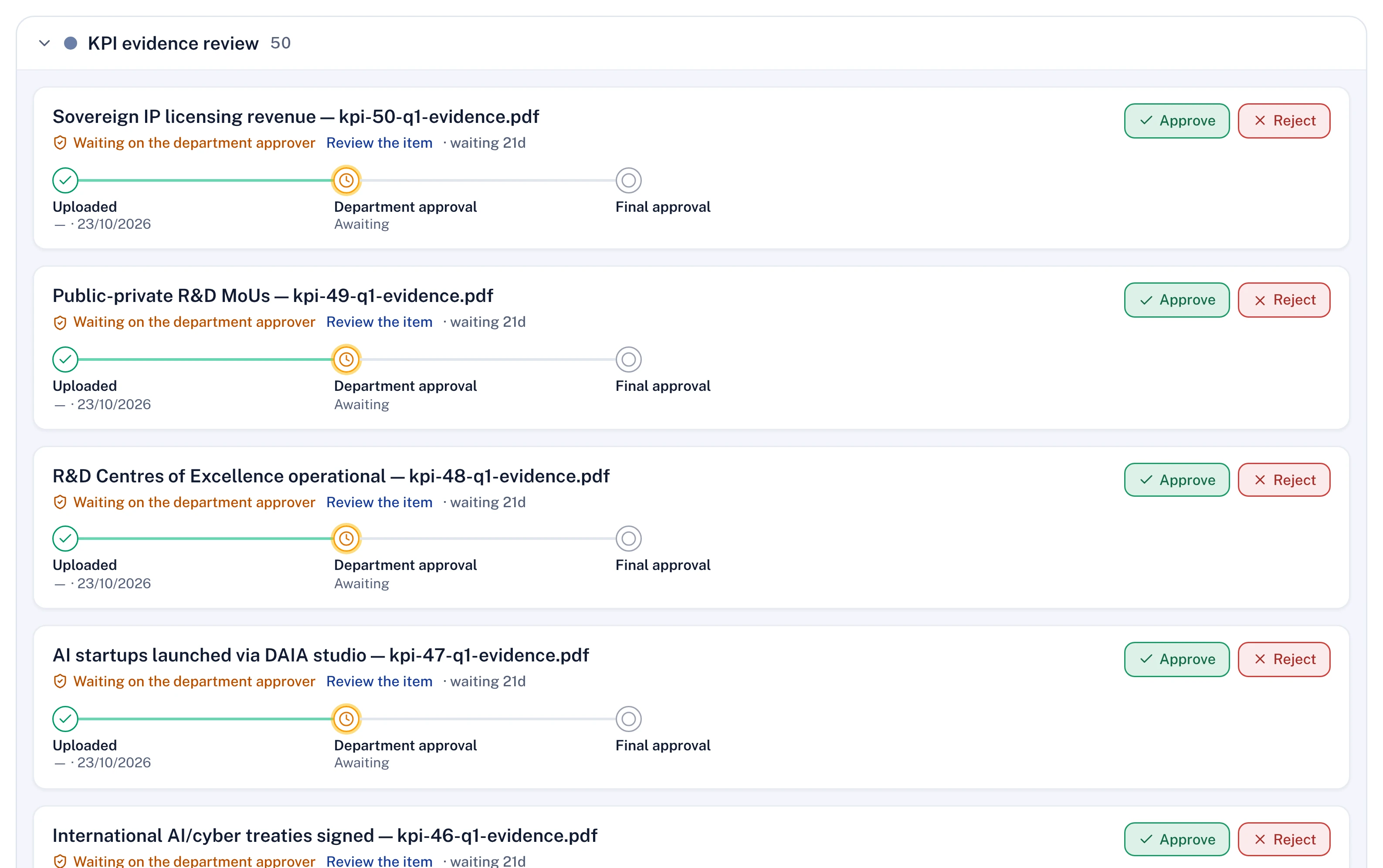
Every number on the dashboard is backed by evidence the right authority approved.
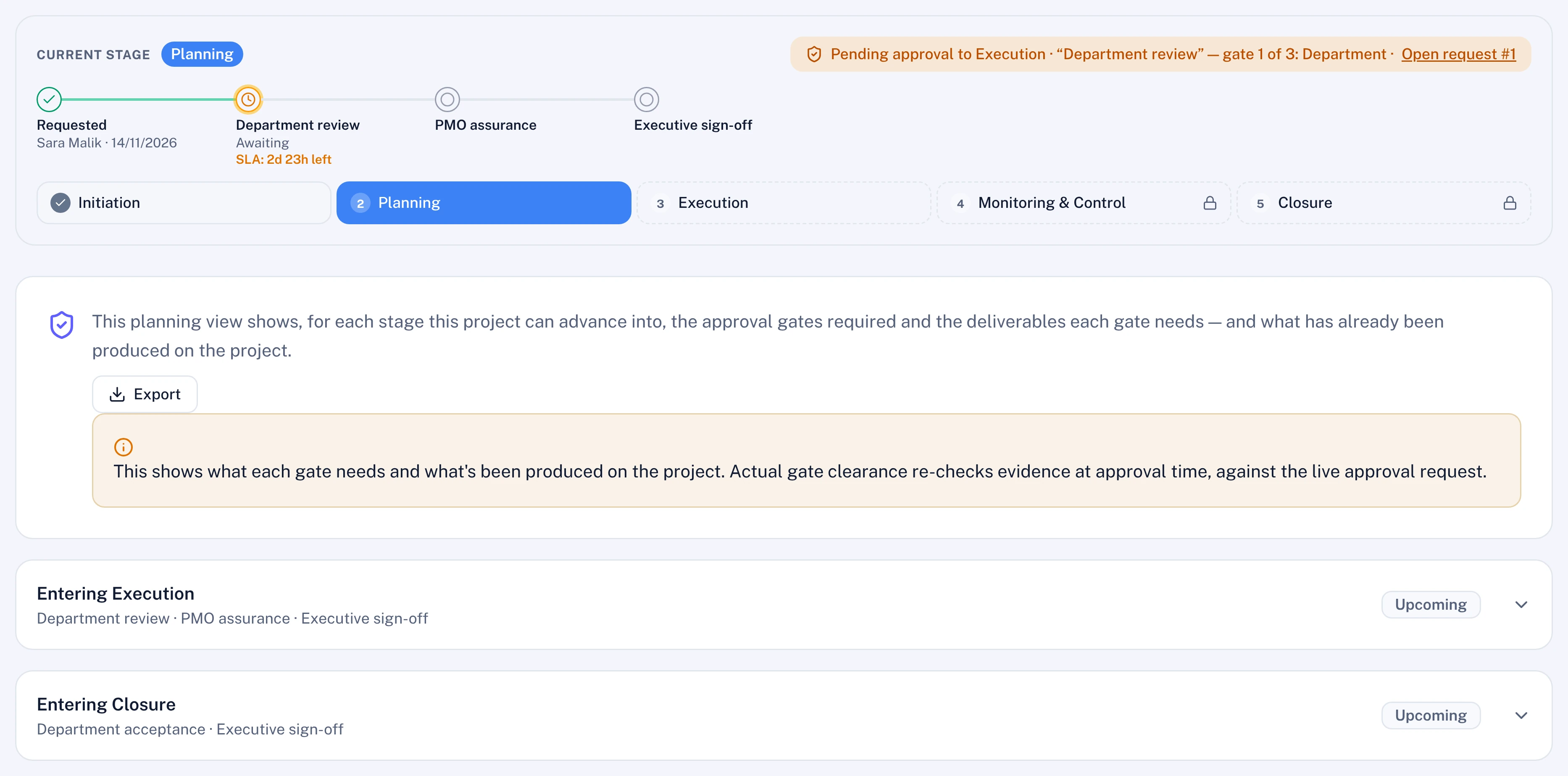
Progress, KPI readings, gates and decisions all travel the same governed path. Nobody grades their own work, nothing counts until it is approved, and the record cannot be edited afterwards. That is what makes the numbers worth trusting, and what makes the system hard to game.
- 1Claim
A team reports an activity done or a KPI reading in.
- 2Evidence
The files, forms or documents the gate requires are attached. No evidence, no submission.
- 3Polaris challenge
The AI reads the files, works out the value without seeing the claim, and gives the approver what holds up and what to question.
- 4Governed approval
The person your delegation of authority names approves, on the route your own procedures set and against a deadline. Never the claimant.
- 5Locked record
The approver signs a frozen, hashed copy. The audit log cannot be edited or deleted.
- 6Counts in the roll-up
Only approved progress reaches the dashboard. Until then a claimed 100% stays capped.
What it stops
- Greens with nothing behind themStatus comes from dates and approved evidence, so a project cannot type itself green.
- Marking your own homeworkThe person who raises a request can never approve it, administrators included.
- Swapping the file afterwardsApproved evidence is frozen and hashed, and cannot be deleted.
- Parking work just under the lineA detector flags progress that sits at the cap waiting for approval.
- Spend running ahead of deliveryBurn against progress is checked on every project, every cycle.
- Quietly changing the rulesWorkflow and approval changes are recorded with who made them and when.
From the blog.
Our founders on how large programmes are governed, measured and run. All posts
Change management fatigue: bring the next tool to where people work
Every new tool brings its own change programme, and the people asked to update it have the least time. Take the update to where they already talk, accept what they already write, connect the systems that hold the rest, and keep every approval where it was.
OKR software or a strategy execution platform: how to choose
OKR software is enough while the office answers only for alignment. Once it must say which work moves which key result, at what cost and with what risk, it needs a strategy execution platform that holds OKRs, KPIs and the work in one model. Test that on your own data.
Onboarding PMO software without a change programme
Most onboarding plans spend the adoption budget on training the people who will update the plan. Buy for those people instead: an update without a login, the systems of record connected before go-live, one portfolio first, and the same governance whichever channel an update comes from.
Certified to ISO/IEC 27001:2022. Audited to SOC 2 Type II.
Hosted wherever you need it, on any cloud, in your own data centre or air-gapped, with AI on the model you choose. Security and hosting