In short
- Training teaches a screen. It does not make a weekly update cheaper for the person who gives it.
- Accept the update in the words and documents people already use. Turning it into fields is the system's job.
- Count updates received, not logins. Only the first shows that the plan is current.
The launch email goes out on a Monday. A new programme platform, a training calendar with four sessions to choose from, a short video, and a line saying that from next month every status update will be made there. It is the third email of its kind this year.
The site engineer reads it on her phone between two inspections. She already writes a daily site report, keeps the contractor's schedule in a spreadsheet and answers her project manager in the team chat. The new platform will ask her for the same facts in a different shape, on a screen she will open once a week.
Six weeks later the PMO analyst is chasing again. The platform has its login page, its training figures and some of the updates it was promised. The rest arrive on Wednesday night in the old template, or not at all.
Everyone in a transformation office knows this pattern, and most people dread it. Every transformation adds a tool, and every tool brings its own change management programme. Change fatigue is what builds up. In the programmes I have worked in, new tool adoption failed less often for lack of training than because each update cost the busiest people one more task.
What goes wrong with new tool adoption
Training-led change management assumes the hard part is knowing where to click. For the people who update a programme, the hard part is the cost of each update, paid every week by the people with the least time to spare.
The people who update are the busiest in the programme. The steering committee reads the platform. The site engineer, the project manager running three contracts and the department lead with a team to manage write to it. Their day is the delivery, and every minute on an update is taken from the work the update describes.
Every tool is another login. A platform opened once a week is one whose password is forgotten and whose screens look new each time. Training teaches a procedure people repeat four times a month. By the third week, what they remember is that it was slow.
The update asks for a format nobody writes. The facts already exist, in the site report, the minutes of the contractor meeting and the planner's spreadsheet. The tool wants them again as fields, percentages and drop-down values. That is double entry, and the copy that loses is the one that serves only the PMO.
Nothing comes back. An owner who submits an update hears nothing. Nobody replies or asks a follow-up question, and the next contact is a reminder that next week's update is due. A task that is never acknowledged feels like a chore, and chores are done last.
Adoption is measured by attendance and logins. The rollout report counts who was trained and who signed in. Neither shows whether the plan is current. A programme can meet both targets while its status is three weeks old.
Together these make a loop. Updates arrive late, so the PMO chases. Chasing turns the update into an obligation to the PMO, so it arrives later still. Then a new tool is bought to fix the reporting, and it brings another change programme with it.
What good looks like
The aim is an update that costs the person who gives it almost nothing, while the programme keeps every control it had. Five moves, and none of them depends on a particular platform.
Put the update where people already talk
Teams talk in a chat tool all day: Microsoft Teams, Slack, and often WhatsApp for people in the field. Ask for the update there, in plain words, and accept the answer in plain words. "Piling on block C is finished and the crane is down until Thursday" is an update. Project updates in Teams or Slack cost the owner a sentence. Turning that sentence into fields is the system's job.
In Lodestar, the Polaris assistant works in Microsoft Teams, Slack and WhatsApp as well as in the app's own chat. It reminds each owner what is due, outside quiet hours, and the owner answers in a sentence.
Accept what people already write
Do not ask for a document to be retyped. The site report, the contractor meeting's minutes and the planner's spreadsheet already hold most of what the PMO needs. Let owners send them as they are, and have the reading done for them. The update then becomes a by-product of the work, and stops being a separate task.
In Lodestar, an owner can send a PDF, Word, Excel or PowerPoint file with a message, and the assistant proposes the updates it carries and says plainly what it could not read. Minutes can be drafted from a meeting transcript for the reviewer to approve.
Show the change, and keep the approval
An easy update must still be a governed one. Show the person exactly what will change in the record, field by field, before and after, and change nothing until they say yes. A change that needs approval in the platform needs the same approval when it arrives through a chat.
The channel should change how easy an update is to give, and nothing about who may accept it.
In Lodestar, each proposal is a card showing the values before and after, and nothing changes until the person presses Apply. The change is made with that person's own permissions, and where an approval workflow governs it, it goes for approval and applies once approved.
Connect the systems that already hold the data
Much of any status already sits in another system: the schedule in Microsoft Project or Primavera P6, the tickets in Jira, the actuals in the finance system. Asking a person to copy those across is double entry in its purest form, and the copy will always lag. Connect the source, let it refresh, and keep people for what only people know: the reason, the risk and the judgement.
In Lodestar, Microsoft Project schedules saved as XML and Primavera P6 schedules are imported and updated in place on re-import. Connectors bring in work from Jira, Asana and Smartsheet, actuals from the finance system and rows from read-only database connections, with their credentials stored encrypted.
Count updates received, not logins
Measure PMO software adoption by what reaches the record: how many owners updated this period, how many updates came in on time, how many had to be chased. A login shows that someone found the page. An update received shows that the plan is current, which was the reason for buying the tool. The sponsor's side of the same problem is in A platform nobody opens.
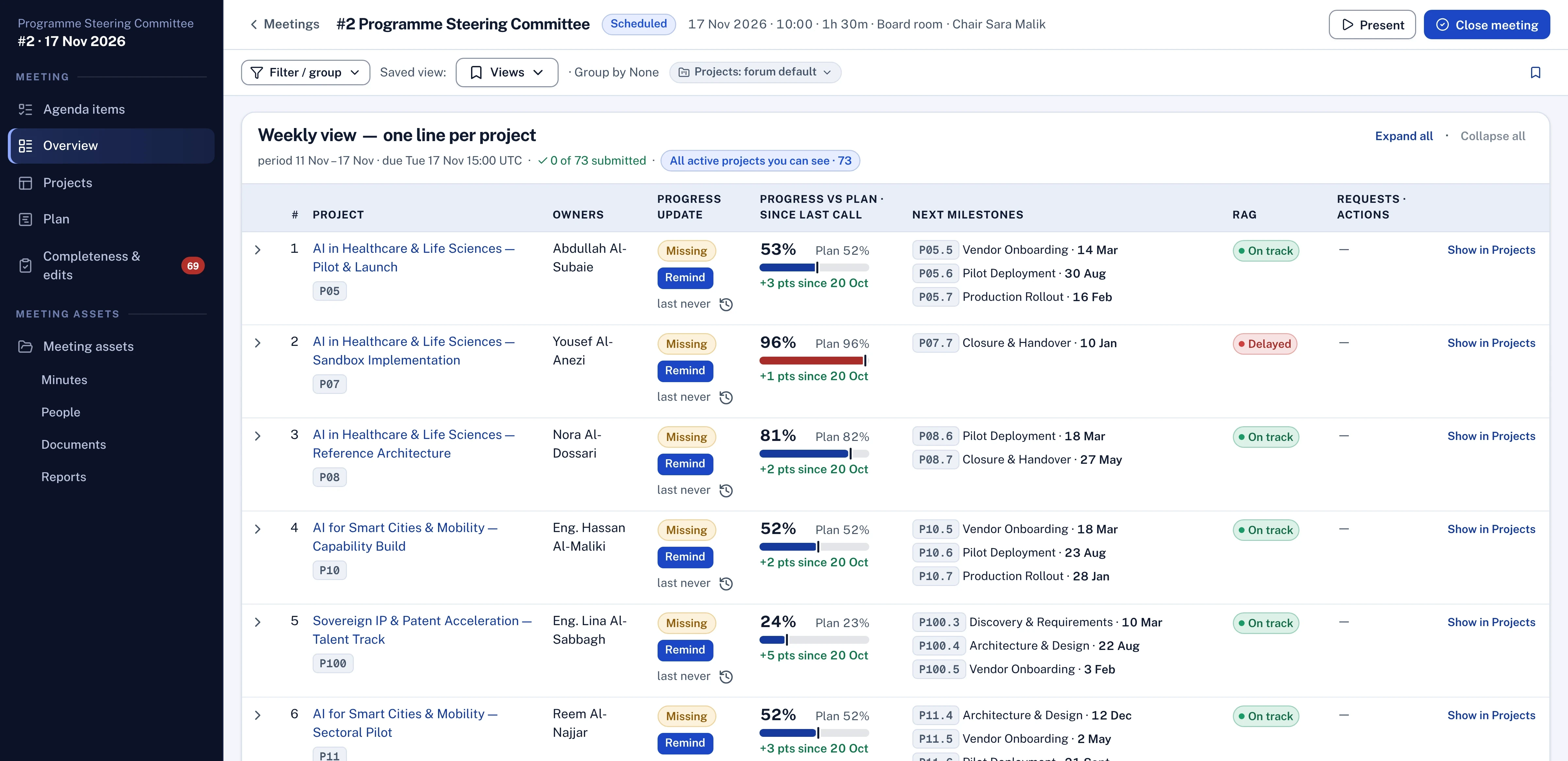
In Lodestar, the meeting host shows how many projects have been updated for the period and when each owner last updated, with a Remind button beside each one.
Questions for your next review
- Where do the people who update our programme spend their working day, and in how many places are they asked to update?
- Which facts in our status report already exist in a site report, a minute or another system, and who retypes them?
- When an owner submits an update, what comes back to them, and how soon?
- Does an update that arrives through a chat pass the same approval it would in the platform?
- Last month, how many updates arrived on time without a chase?
Change fatigue is rarely about the people. It comes from asking the busiest of them to pay for every new tool, and it eases when the tool comes to them and the approvals stay where they were.

Hany is a strategy and transformation executive with a technical background in software and AI. He has advised C-suites at a top-three strategy consulting firm (MBB) and independently, and has run transformation programmes of more than USD 1 billion.
Connect on LinkedIn